Assets: what each rental property actually earned
v0.1.322 min read
- Assets: a new page in the menu that turns a rental property's transactions into its own books for the year. Rent in, expenses out, and what it actually made.
Why we built it: We have a rental property that we put on Airbnb and one that has a long-term tenant. All the rent comes in as income and all our expenses show up as spending. We needed a foundation that shows that income as it truly is, which is really the net. This will also be the foundation for how we keep our books and file taxes.
What you can do
- Add a property in a minute: open Assets and click Add a property. Say how you use it: you live there, you rent it long term, you rent it short term, or it's land. Then give it a nickname, and for a rental, the purchase price, the closing date and the date it was first available to rent.
- Use the tag you already have: the last step asks which tag tracks this property. Pick the one you've been using and every transaction already on it shows up. No tag yet? Synx creates one with the property's name.
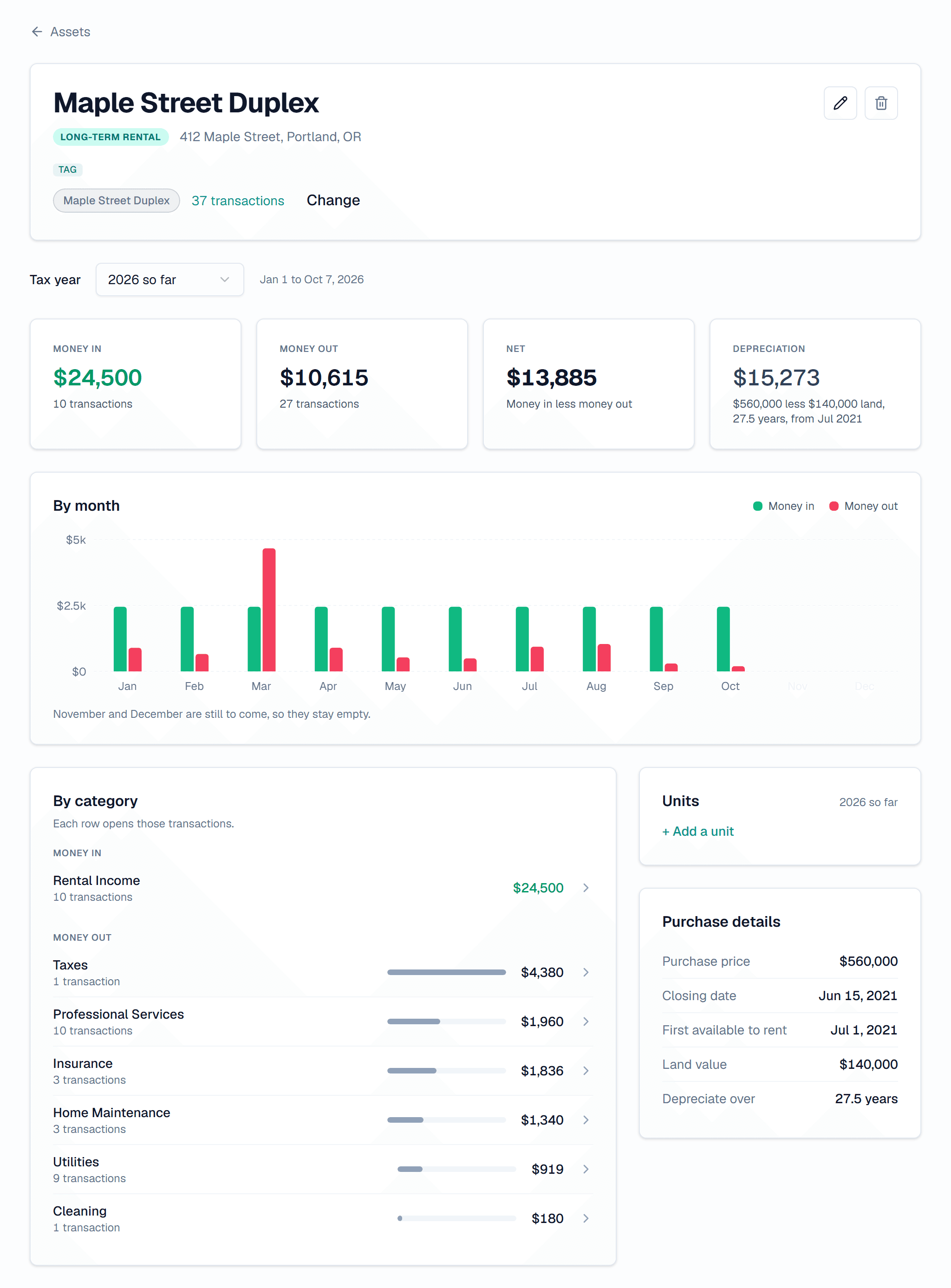
- See one tax year at a time: open a property to see Money in, Money out and Net for the year, month by month. Switch years with the Tax year picker.
- Find where the money went: By category breaks the year into rent, repairs, insurance and the rest. Click any row to open exactly those transactions.
- Track a unit on its own: a duplex or a house with an ADU can have units. Each unit gets its own tag, and its money counts toward the property's total. Mark a unit you live in yourself and its costs stay out of the rental's numbers.
- Get a depreciation estimate: for a rental, add the land value and Synx works out a yearly depreciation figure from the purchase price, spread over 27.5 years unless you change it. The page shows exactly what went into the number.
- Fix anything later: edit the property, change its tag, or delete it from its own page.
Good to know
- Depreciation is an estimate: it's a starting point to check with whoever does your taxes, not a filed number.
- Shared with your household: in the household view, both of you see every property in the household, and either of you can edit one. Your personal view shows only your own.
- Rental properties first: small businesses, vehicles and private investments aren't here yet. If you own something we don't track, click Tell us on the Assets page and say what it is.
- On the web for now: Assets lives in the Synx web app.