
How I nearly automated my Airbnb's finances
One tag, a few automation rules, and receipts that attach to the right charge on their own
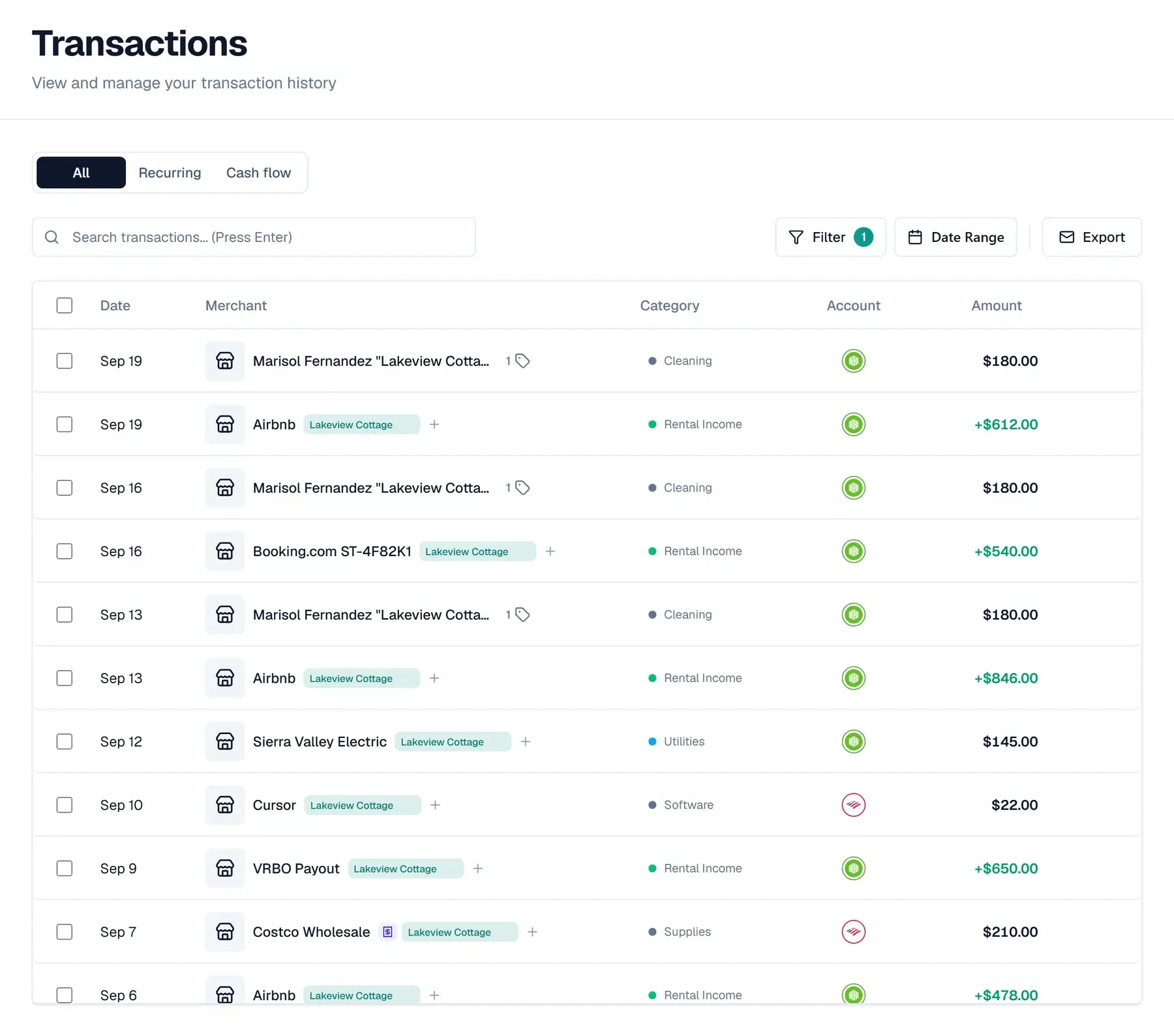
I live on a property with two rentals. One is an Airbnb attached to my house, with its own entrance. The other is a unit in the backyard that I rent long term. My house and both rentals share some bills, like electricity, and that's where the bookkeeping gets messy.
I used to track all of it in a spreadsheet that I updated by hand every two weeks. I also tried QuickBooks Online, but it cost way too much for two rentals. Receipts went into a folder on my phone. None of them were tied to a transaction, so my accountant had to match them up at tax time. That made my accountant's bill higher.
Now I track it in Synx with one tag per rental, and most weeks I don't touch it at all. Automation rules tag the payouts and the cleaner payments as they come in. Shared bills split themselves between my house and the rentals. Receipts I forward attach themselves to the right transaction. This year the Airbnb's tag has about $35k in payouts on it, and I didn't add any of that up by hand.
Below is how I set it up and the automation rules that do the work for me. The screenshots use made-up names and numbers: the Airbnb is Lakeview Cottage and the long-term rental is Lakeview ADU.
How I set it up
Six steps. None of them needs a separate bank account for the rental. Mine doesn't have one.
1. Make one tag per rental. I have one for the Airbnb and one for the long-term rental. I also keep one for my own house. It tracks improvements that add to the house's cost basis, in case I ever sell. A tag is just a label you can put on any transaction, on any account, and filter by later. Make them in Settings, then Tags.

You can also make one from any transaction. Type the name into its tag box, and if the tag doesn't exist yet, Synx offers to create it.
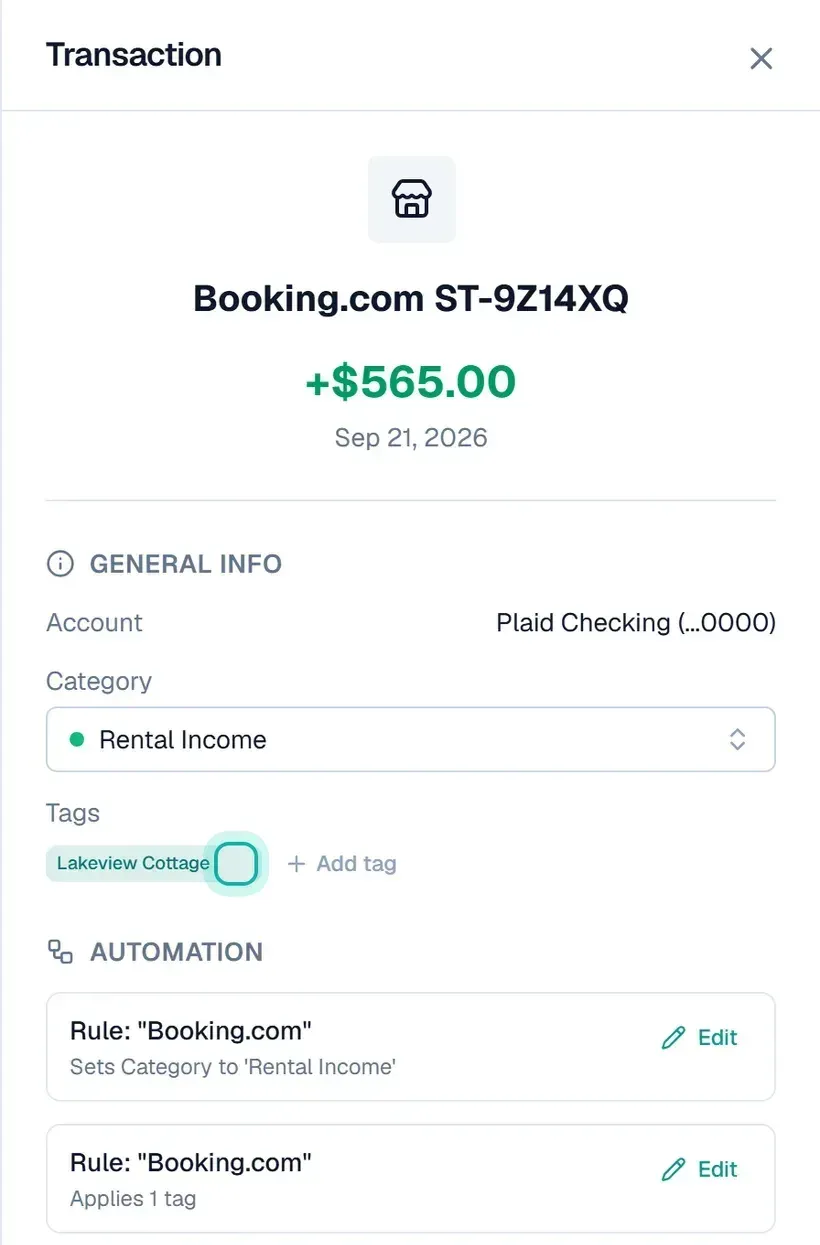
2. Automate tags for every payout. Airbnb, Booking.com and VRBO all pay out differently. Airbnb shows up as plain "Airbnb". Booking.com shows up with a reservation code on every deposit, like "Booking.com ST-4F82K1". VRBO shows up as "VRBO Payout". All of it gets the Airbnb's tag and the Rental Income category. I set up a pair of automation rules per platform, and every payout after that gets tagged and categorized on its own. The rules section below shows how. The one guest who pays me directly by transfer, I tag by hand under Tags.
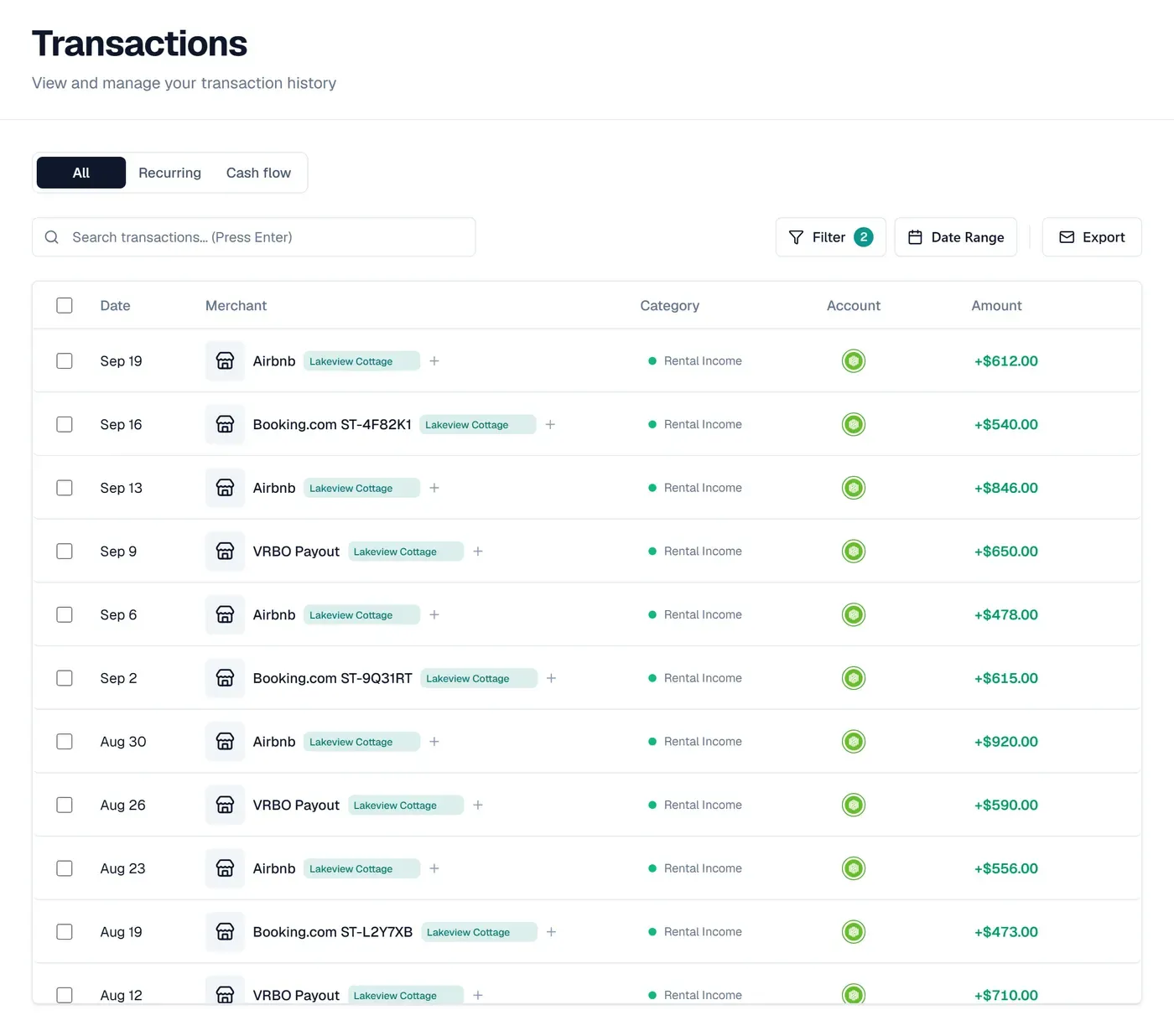
Filter the list to the tag and income only, and every payout from every platform sits in one list.
3. Tag the costs wherever they happen. I pay for the rental with whatever card is in my hand. Supplies go on one card, software on another, the electric bill comes out of checking. That's fine. The tag goes on the transaction, not the account, so a filter on the tag pulls costs from every card into one list. My own tag covers eight accounts.
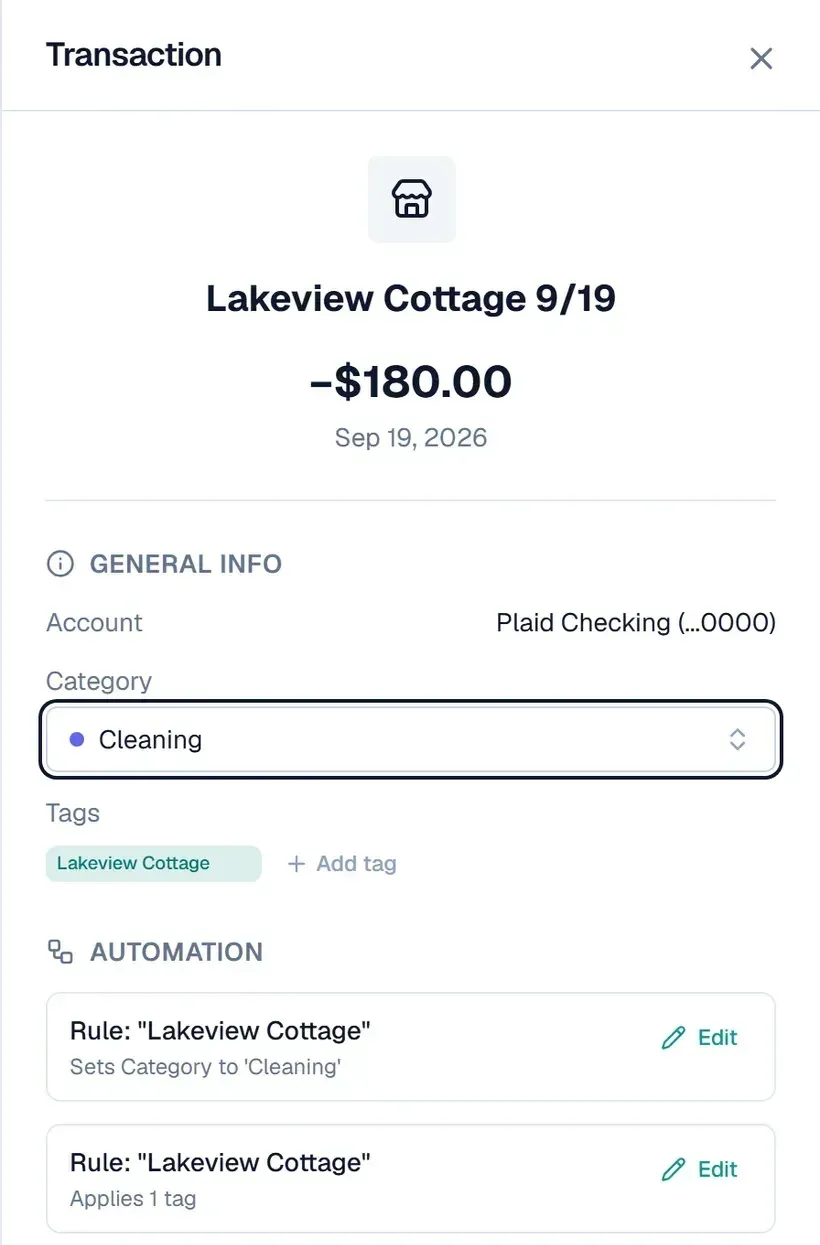
4. Put the turnover date in the cleaner's payment memo. I pay my cleaners by Venmo and Zelle. Every payment gets a memo like "Lakeview Cottage 9/19", the name of the property and the day they turned it over. In my bank feed the memo comes through as part of the transaction name. Filter to the tag and the Cleaning category and you have a cleaning log: who cleaned, which day, what I paid. The memo also lets an automation rule tag the payment for you. More on that below.
5. Split the bills you share. One electric bill covers my house and both rentals. I split it three ways: 50% to my house, 30% to the Airbnb and 20% to the long-term rental. Each rental's part gets that rental's tag. My house's part stays untagged, because electricity doesn't add to its cost basis. That way each rental's numbers only carry its own share.
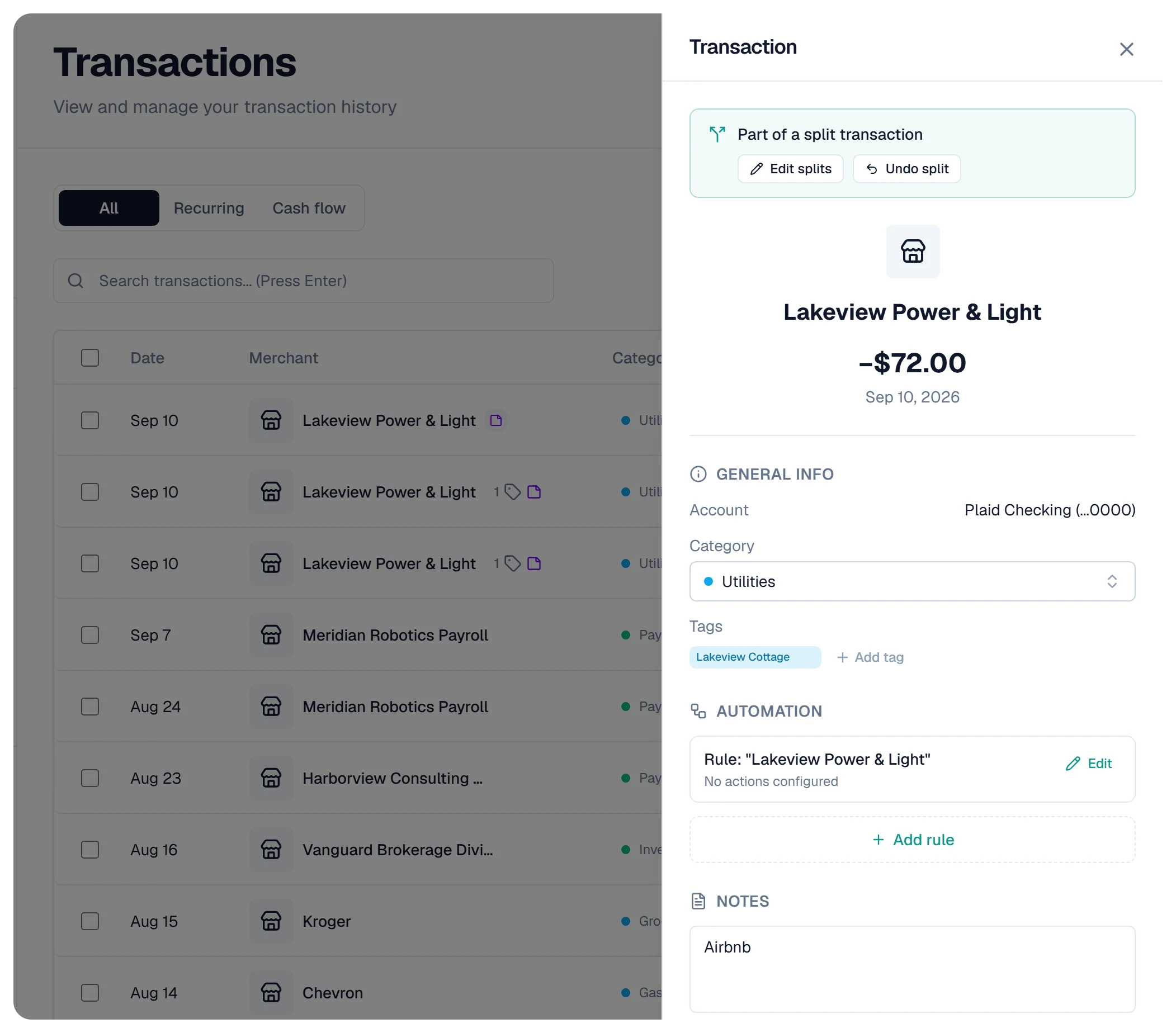
I don't do this by hand. A split rule on the electric company splits every bill by those percentages as it comes in, whatever the total is that month. My recycling pickup gets the same treatment.
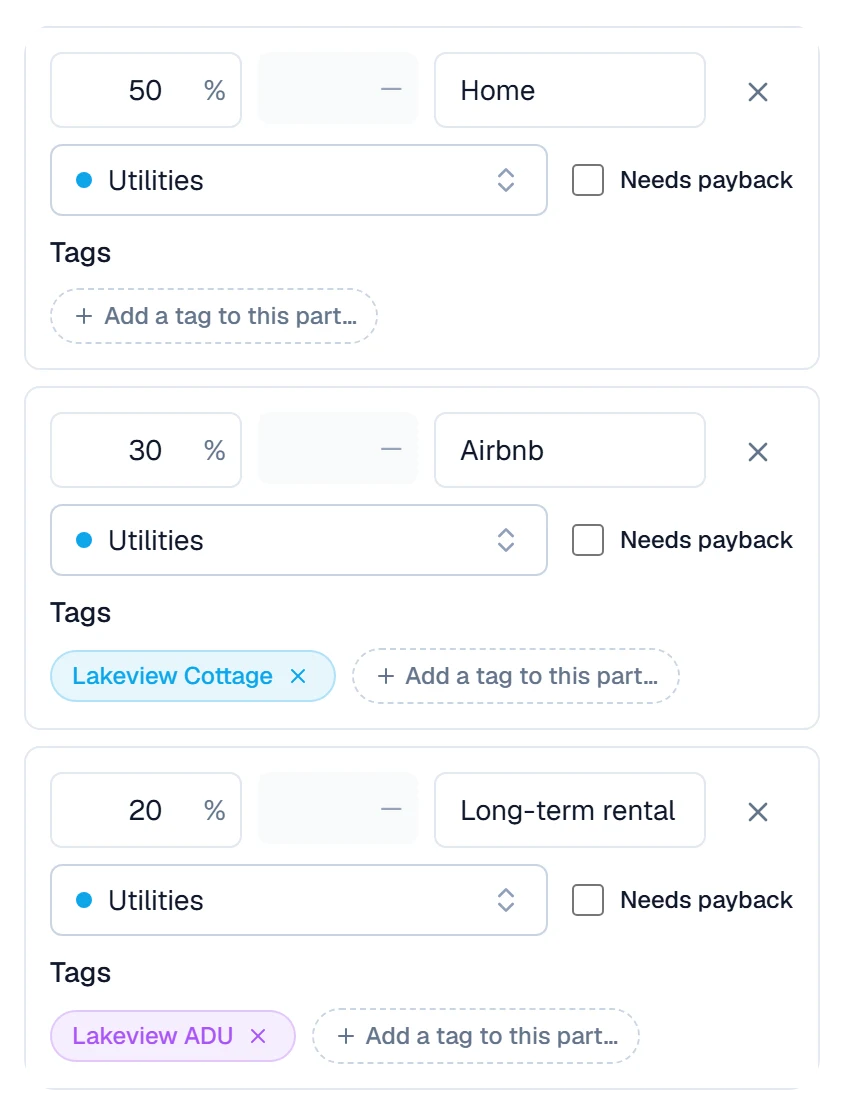
6. Forward your receipts. This is the step that used to cost me money. I'd snap every receipt into a folder on my phone, and none of them were matched to a charge. Matching them was work my accountant did at tax time, and I paid for it.
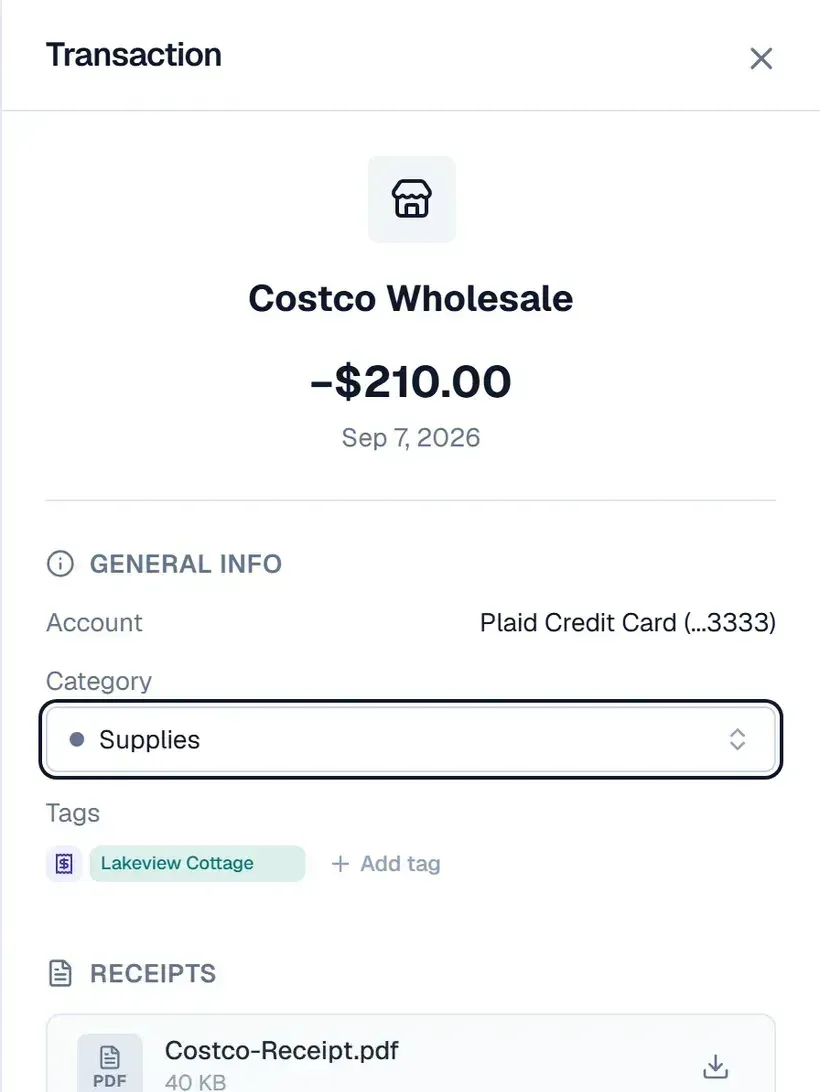
Now anything I'd have to prove later, like a Costco run for guest supplies or the electrician's invoice, gets forwarded to my private Synx address. Synx finds the matching transaction and attaches the receipt to it. The transaction list marks it with a small receipt icon. There's no folder to keep up and nothing to match later.
Let automation rules do the tagging
Six steps sounds like a lot. Rules do most of it for you.
A rule in Synx looks at two things: the text of the merchant name, and which account the transaction hit. When both match, it sets the category, adds the tag, or splits the charge. You'll find them in Settings, then Rules.
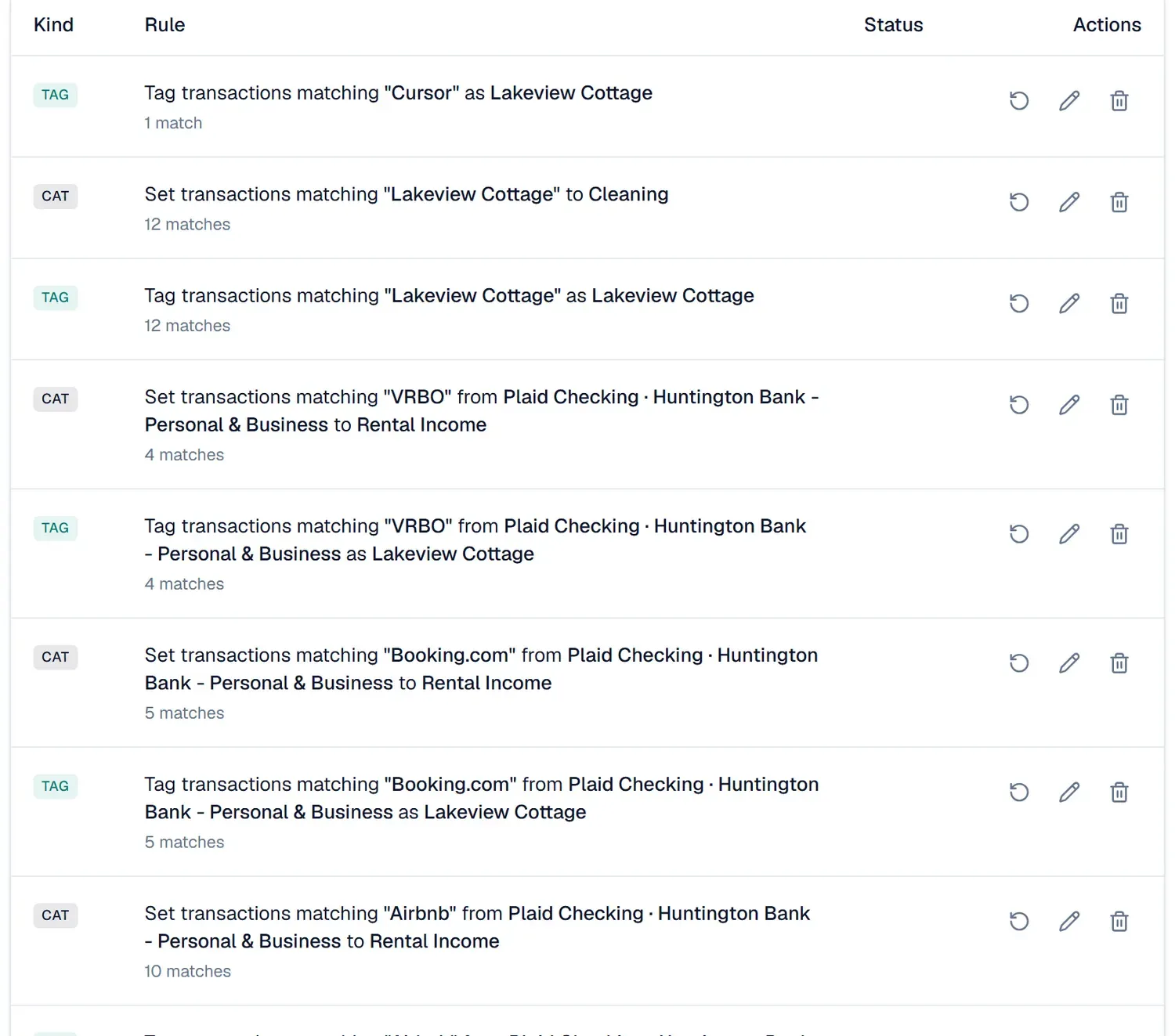
One pair of rules per platform. For each of Airbnb, Booking.com and VRBO I have two rules. One tags the payout to the property. The other files it as Rental Income.
Both rules are limited to the checking account the payouts land in. That account condition matters more than anything else in the rule. When I stay at somebody else's Airbnb on vacation, that charge also says "Airbnb". It goes on a credit card, though, so the rule skips it and my vacation never lands on the rental.
A new rule doesn't only cover what comes next. Before you save, Synx counts the past transactions it matches and offers to apply it to those too.
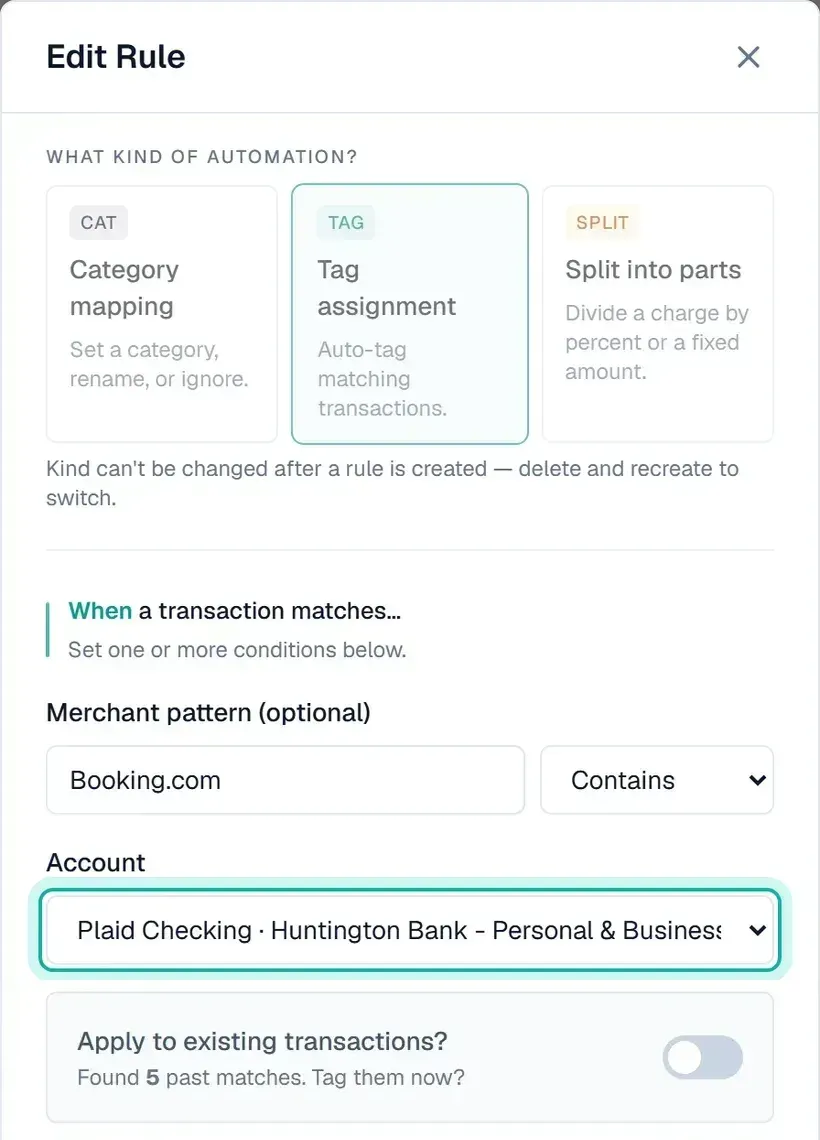
The memo trick. This is the one I'd set up first. Remember the cleaner memo, "Lakeview Cottage 9/19"? I have two rules that match any transaction containing "Lakeview Cottage". One adds the tag. The other files it as Cleaning.
So all I do is pay the cleaner. I type the property name and the date into the Venmo memo, the way I always did, and the payment arrives in Synx tagged and filed. I never open it.
Software that runs the rental gets a rule too. I pay for a couple of tools that run an automated flow for messaging my cleaners. They also do work for Synx, my other business. So a split rule sends part of every charge to the Airbnb's tag and the rest to the business's tag. Each one only carries its own share, and nothing gets counted twice.
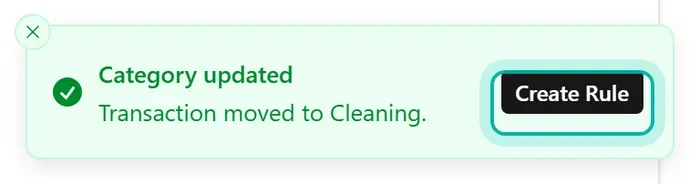
The fastest way to make a rule. Change the category on one transaction. Synx shows a message confirming the change, with a Create Rule button on it, as long as no rule already covers that transaction. Tap it and the rule editor opens with the merchant name and your new category filled in. Trim the merchant text down to the part that repeats, add an account if it needs one, and save.
Stores you shop at for both. Costco and Target are personal for me most of the time, so I don't put a rule on them. When I do a supply run for the rental, I tag that one charge myself, which takes a few seconds.
Seeing how the property did
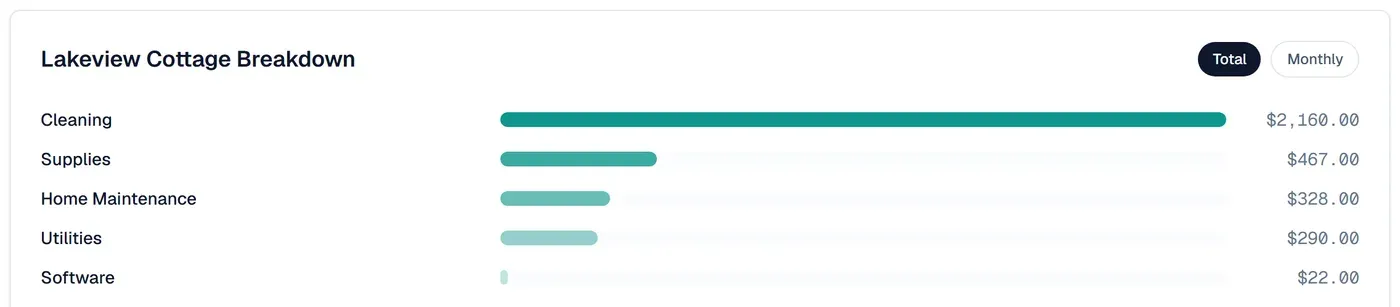
On the Spend page there's a section called Tagged Money. Click the property's tag and you get its costs broken down by category, as a total or month by month.
When it's time to hand things over, I filter the transactions list to the tag and export two things:
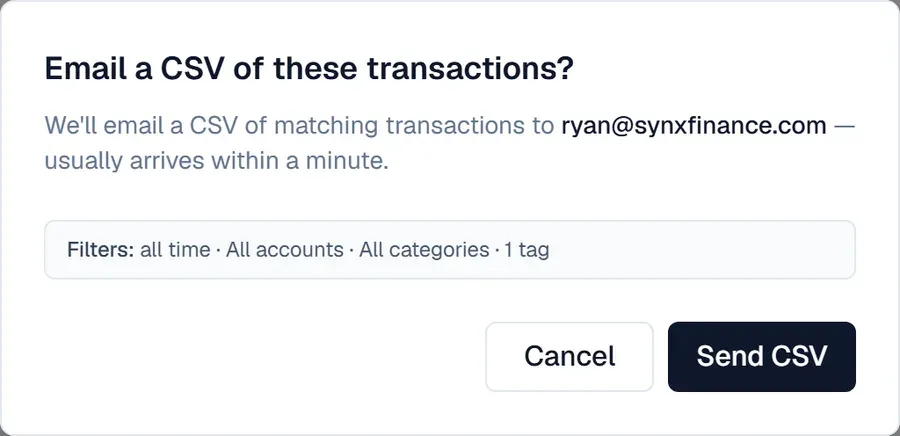
- A CSV. The Export button emails you a spreadsheet of every transaction matching the filter you have on. It lists the filter in the confirmation, so you can check you're sending the right thing.
- The receipts. Tick the box at the top of the list to select everything, and the Receipts button in the bar that appears downloads the receipts for every transaction matching the filter, not only the rows on screen.
That CSV and the receipts are what my CPA gets from me now. Every receipt is already tied to its charge, so there's nothing left for them to match.
What it costs
Synx is $35 once for the software, plus $0.40 a month for each bank you connect. There's no subscription. Tags, automation rules and splits are all part of that. Each forwarded receipt costs 8 cents, because reading it costs us real money, and you only pay for the ones you send. The full breakdown is on the pricing page, and the Synx Promise lays out how we set prices.
Using Synx now? The business features are free for you. The tax-time features previewed below will be one-time add-ons, priced per asset, once they're built. If you're on Synx before they ship, you get them at no charge.
What we're building next
That's everything I do during the year, and it takes me almost no time. A few tax-time jobs still happen outside Synx, and those are what we're working on now.
Each one below has a picture of what we're building. None of these screens are in Synx yet, and I'm not giving a date.
Preview, not in Synx yet. Every image from here down is a mockup with made-up numbers. What we're building is a worksheet for you or your CPA. It isn't tax advice, and it isn't a filed return.
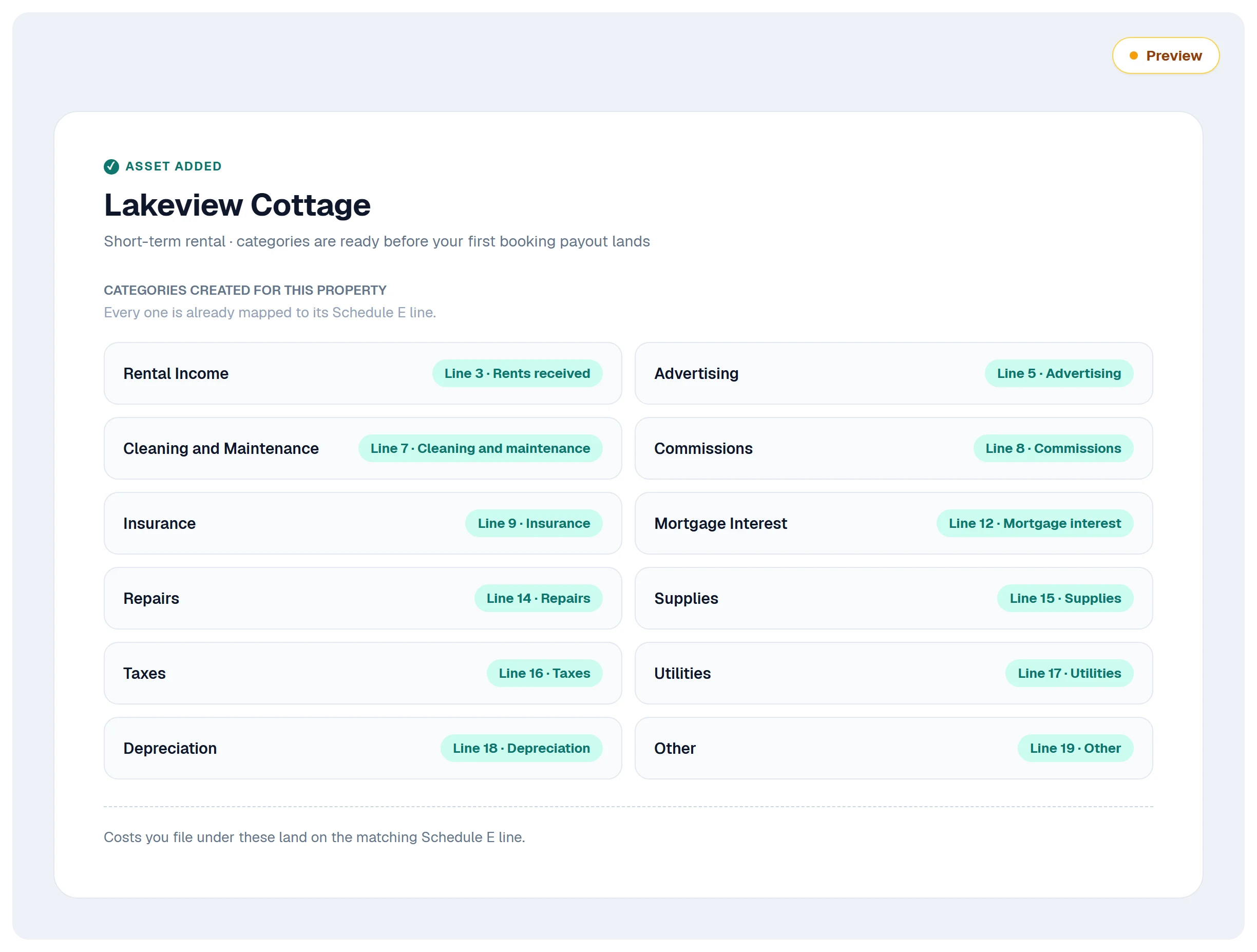
1. Categories that already match Schedule E. Rental income and costs usually go on Schedule E, and it has numbered lines: cleaning and maintenance, commissions, repairs, supplies and so on. Today Synx files things under everyday categories like Cleaning or Shopping. We're building this into Assets instead. When you add a rental property, Synx creates its categories for you, and each one already lines up with a Schedule E line. File a cost under one of them and it's on the right line from day one.
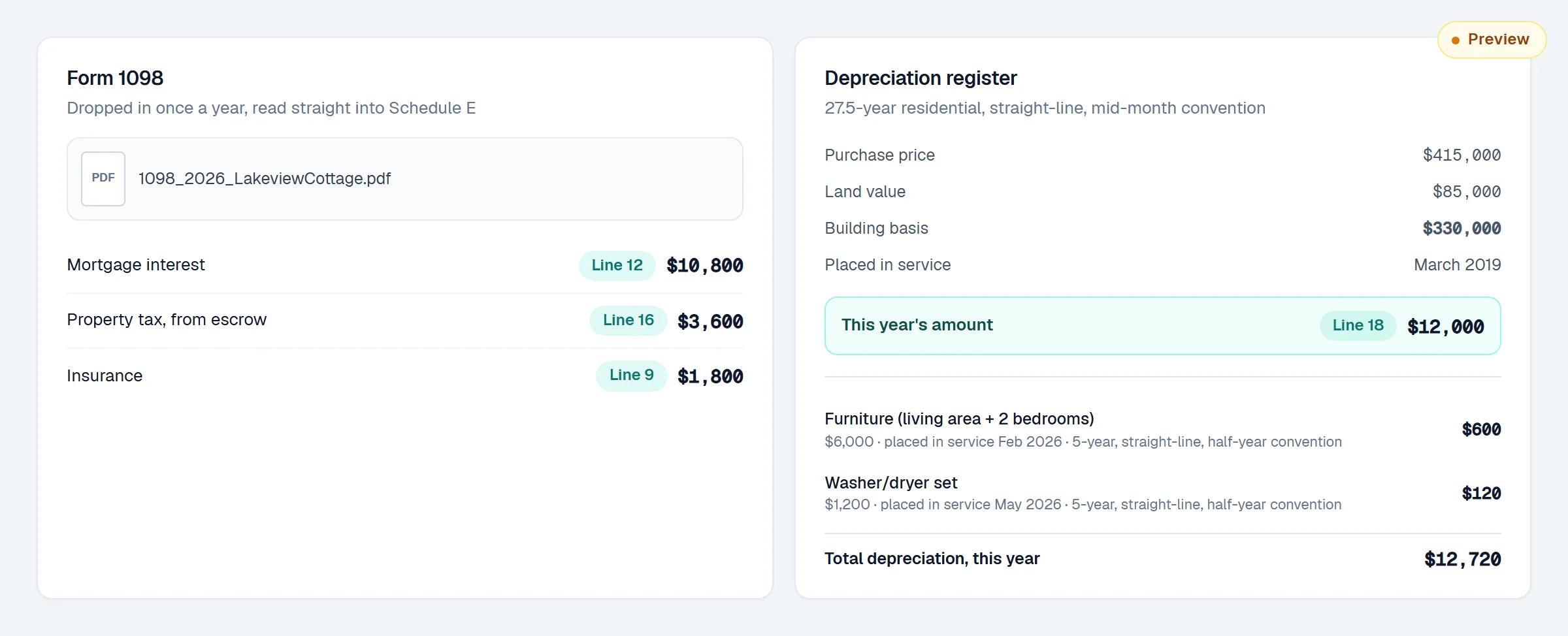
2. The biggest lines never pass through the tag. Mortgage interest, property tax, insurance and depreciation are usually the largest numbers on a rental's Schedule E. None of them shows up in a bank feed as a rental cost. The first three are buried in a mortgage payment, and depreciation isn't a payment at all.
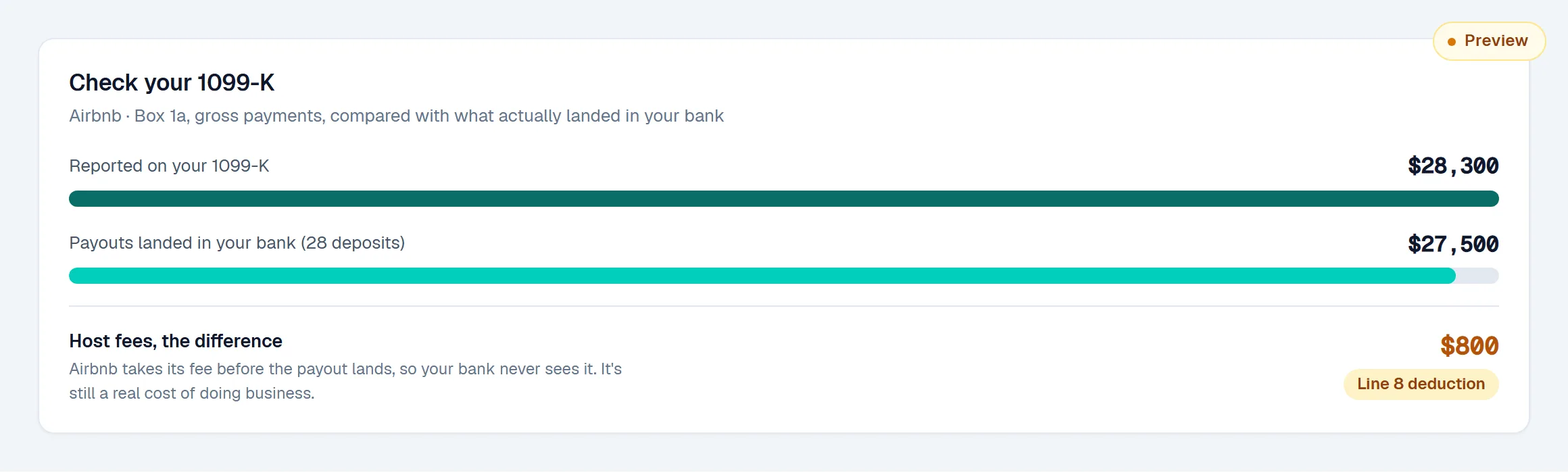
3. Airbnb's 1099-K reports more than landed in your bank. Airbnb takes its host fee before it pays you. So the payouts under your tag add up to less than the gross Airbnb reports on your 1099-K, and the fee itself never shows up as a cost.
What it all adds up to
Once those three are in, Synx can give you two things.
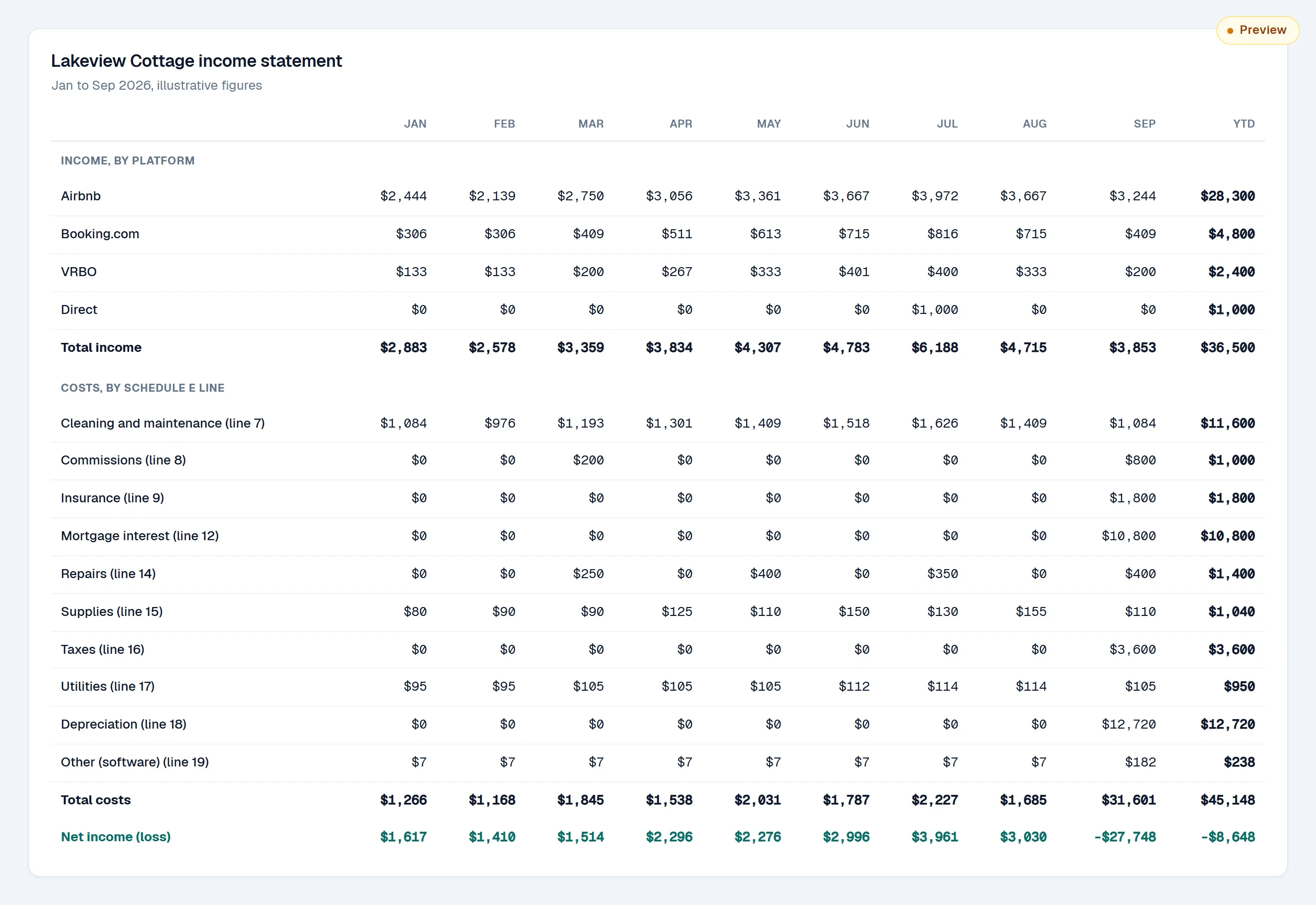
The first is an income statement for each property: months across the top, income by platform, costs by Schedule E line, and what's left at the bottom.
The second is a Schedule E worksheet in the order TurboTax asks for it, with the number that goes on each screen and where that number came from.
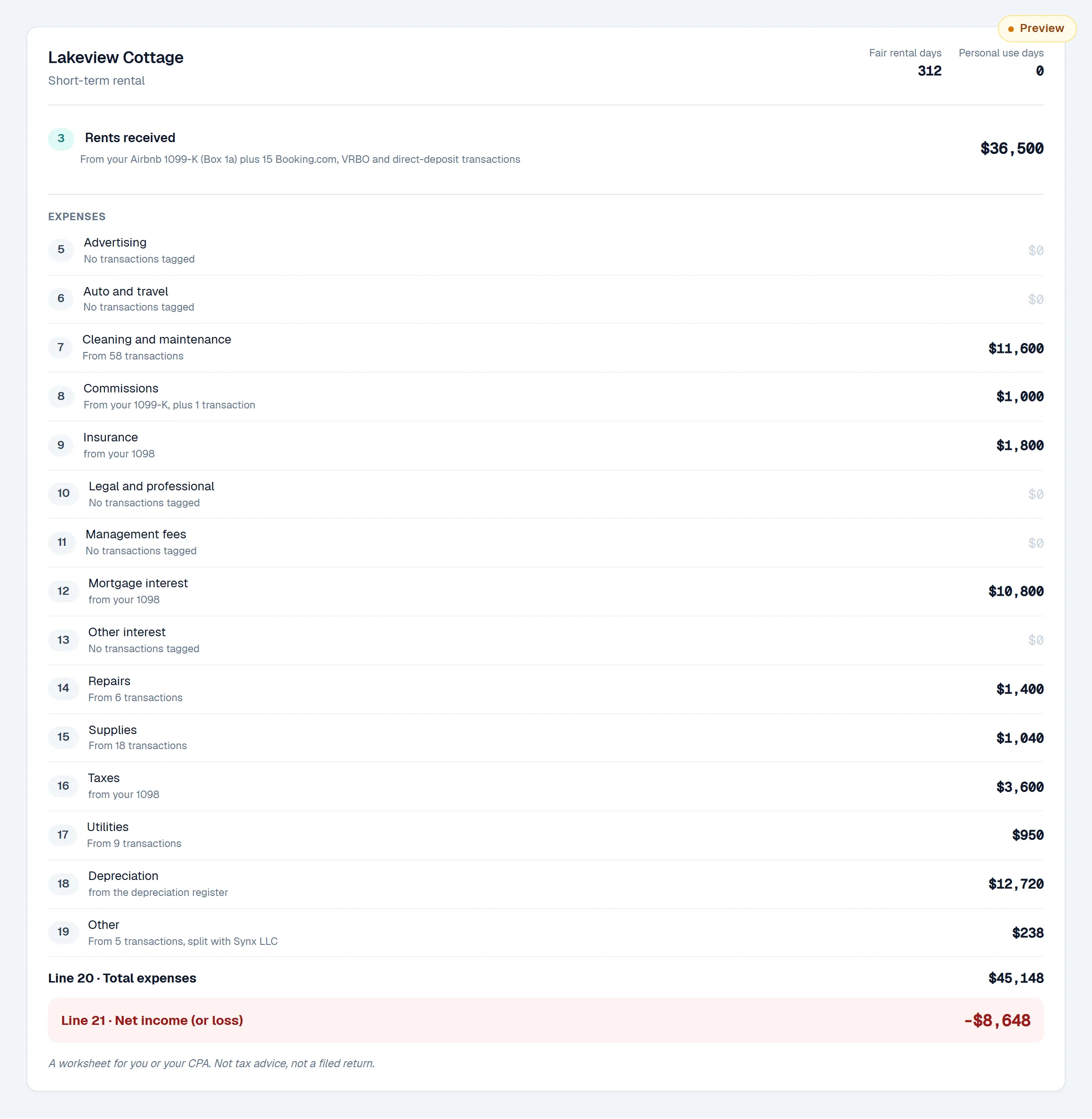
In that made-up example, $12,720 of depreciation turns a year that made money into a loss of $8,648 on paper. You'd never see that from the tag alone.
Whether a short-term rental belongs on Schedule E at all depends on things like your average guest stay (seven days or less changes the picture) and the services you provide, so ask your CPA about yours.
TL;DR: one tag per property, a rule for each payout platform limited to the account it lands in, the property name in every cleaner's memo, and every receipt forwarded to Synx. Once that's set up, the books mostly keep themselves. The tax-time extras are what we're building next.