
Split: keep track of who owes who, and settle up
v0.1.303 min read
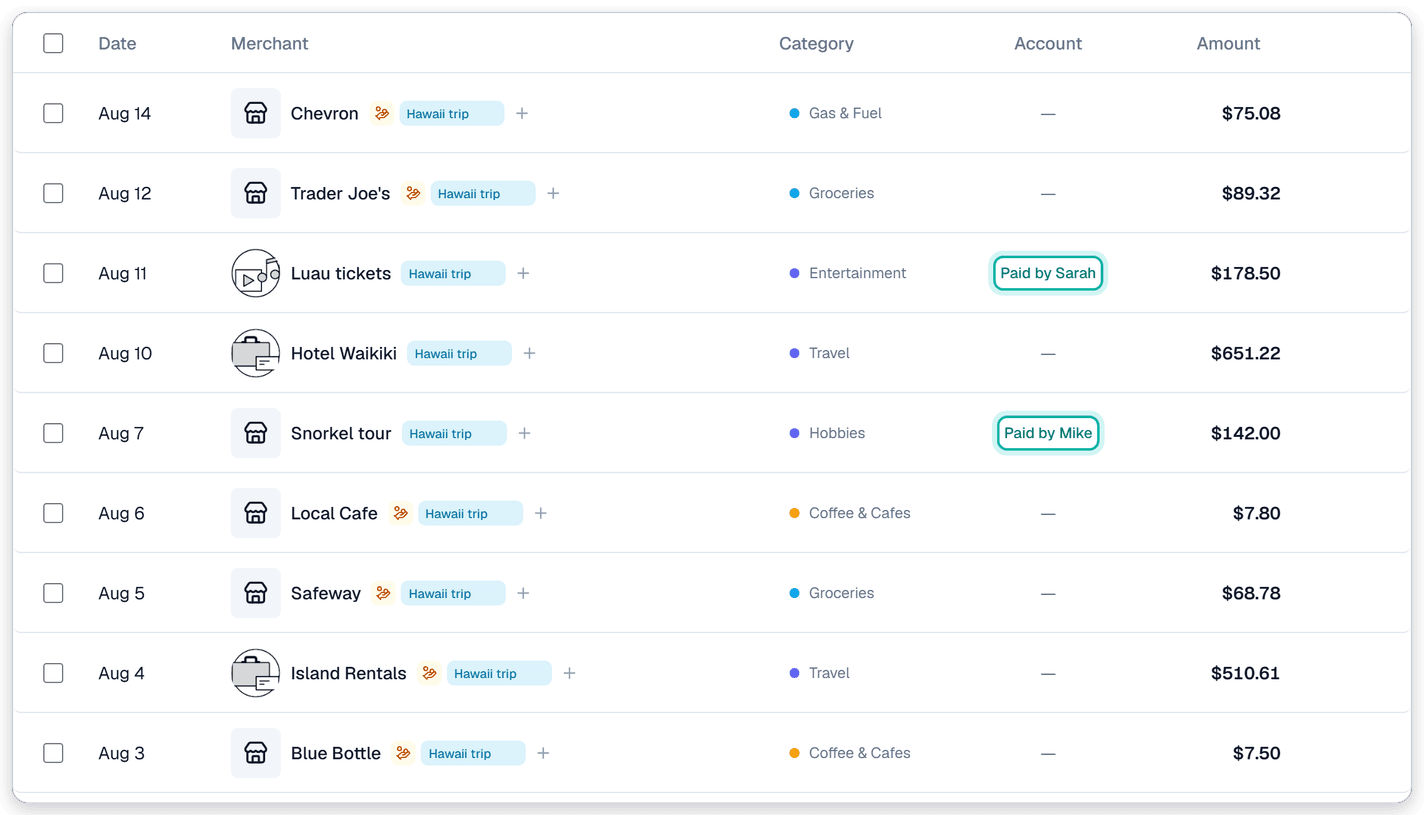
- Split: a new tab on your Transactions page that keeps track of money between you and the people you share costs with. Name who owes you for a charge, log what a friend paid for you, and settle up when the money changes hands.
Why we built it: Splitting one charge, like a dinner bill, is easy. You categorize the Venmo or Zelle payment and you're done. Trips are different. Lots of charges happen, and at the end everyone settles up with one lump payment, usually after adding it all up in Splitwise. That one payment doesn't tell you what the money went to. Split puts each of those charges in your transactions, categorized along with the rest of your spending.
What you can do
- See every balance in one place: open Transactions → Split. Each person gets one line that says what they owe you, what you owe them, or that you're settled up.
- Name who owes you: when you mark a charge Needs payback, Synx asks Who owes this? Pick someone or type a new name. The tag on the charge then reads "Sarah owes" instead of just "Needs payback." Naming someone is optional, so you can still skip it.
- Split a charge between people: split a dinner evenly, by dollar amount, or by percent, and name who owes each piece.
- Log what someone paid for you: tap Someone paid for me when a friend covers your hotel or your half of the groceries. Synx adds the charge to your transactions as "Paid by Sarah," so your spending stays complete even though the money never left your bank.
- Group a trip: tap New group, give it a name like "Tahoe trip," and add the people who came. The group shows what's still open with each of them. Synx can also tag every charge in the group with the trip's name, so you can filter or export them later.
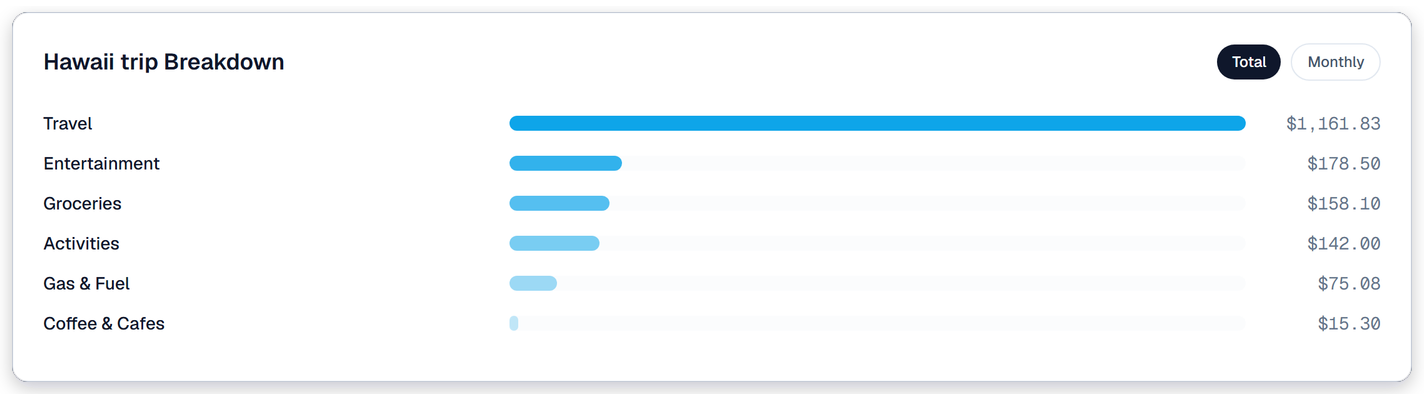
- See what a trip cost, by category: open Spend, find the trip under Tagged Money, and pick it. Charges friends paid for are counted along with yours.
- Settle up against a real payment: tap Settle up next to a person. Check off what the payment covers, then pick the Venmo or Zelle payment you already made or received from the last 30 days. If you paid some other way, choose Paid another way. Settled up by mistake? Tap Undo and everything goes back the way it was.
- Connect with friends who use Synx: invite someone to your network from their name. Once they accept, what they owe you shows up in their Synx under Shared with you, marked "Paid by" you. They can dismiss it, or merge it with a charge they already entered themselves.
- Shared households: switch to the household view and you see each member's balances, labeled with whose they are. Only the person who entered a balance can change it.
Good to know
- How it counts in your spending: a "Paid by" charge counts as your spending, because it was your hotel even if a friend's card paid for it. The Venmo you send to pay them back doesn't count as spending, so the same hotel is never counted twice.
- Cash flow only shows your own bank accounts: a "Paid by" charge stays out of cash flow, because no money left your accounts. The settle-up payment stays in, because it did.
- Synx doesn't move money: Split keeps track of who owes what. You still pay through Venmo, Zelle, or however you like, and Synx matches that payment when you settle up.
- On the web for now: Split lives in the Synx web app. The mobile app will show "Paid by" on these charges in an upcoming update.