
Transaction Splits: one charge, every story behind it
v0.1.7💸 Break a single charge into the pieces it actually was: different categories for each part, and a "needs payback" tag for the times you picked up the bill.
- Transaction Splits: Take any transaction and break it into two or more parts, each with its own amount, category, and note. Pair it with the new needs payback tag for the times you grabbed the bill and friends still owe you their share.
Why it matters: Real spending isn't always tidy. The grocery run had a birthday gift in it. The dinner was you, your partner, and two friends who are paying you back next week. Splits let your categories and totals match what really happened, instead of dumping the whole charge into one bucket, or worse, counting money that isn't really yours to spend.
What you can do
- Split from the transaction detail: Open any transaction and tap Split transaction. The split editor opens right there, with the original amount waiting to be divided.
- Pick the split style that fits: Use Equal to divide evenly across parts, By amount to type each piece in dollars, or By percentage to split by share. Equal mode auto-balances; the others tell you how much is left to assign as you type.
- Give each part its own category: The classic case: the $182 Target run was $140 groceries and $42 a birthday gift. Now your category totals reflect that, not a lump of "Shopping."
- Add a note to each part: Label a piece "Mike's half" or "wedding gift" so you remember what it was when you look back.
- Mark a part as needs payback: Check the box on any split part (or tag the whole transaction) when someone owes you back. It shows up as an amber chip on the row so it's easy to spot.
- Drop paid-back amounts out of your spending: When the Venmo lands, mark the part as paid back. Synx automatically excludes it from your totals so you're not counted as having spent money that came back to you.
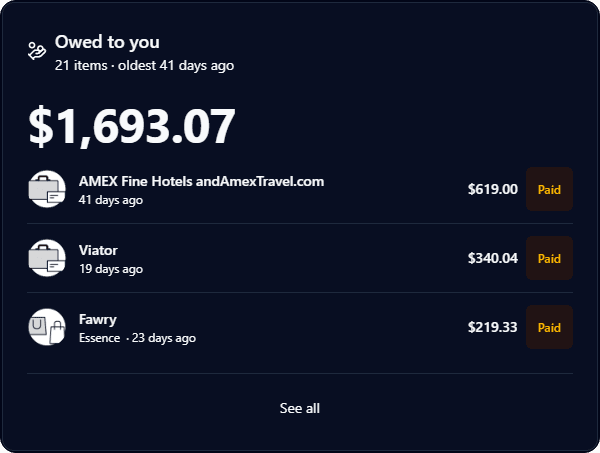
- See what's still owed on your dashboard: The new Owed to you tile sums up every unpaid needs-payback transaction and lists the rows underneath. Mark one paid right from the tile and the total updates instantly; tap See all to jump straight to your transactions list filtered to unpaid only.
- Edit or undo any time: Adjust the parts, change a category, or undo the split entirely and the original transaction comes back as it was.
- Splits travel with your household: Anyone in your household can split a shared transaction, and the parts inherit the original's tags so nothing falls out of your existing views.
Good to know
- Up to ten parts per transaction: Plenty for a group dinner; we cap it so the editor stays usable.
- Split parts replace the original in your lists: Once split, you'll see the parts as separate rows. The original is tucked away so nothing gets counted twice. Undo brings it back.
- Needs payback is a tracking tag, not an invoice: Synx doesn't send a request to the other person. It's there so you can see at a glance what's still outstanding and mark it paid back when the money lands.