← Back to home

Changelog

New features and fixes—plain language, no jargon. We’ll keep this page updated as Synx grows.

Flag a Transaction — tell us when something doesn't look right

v0.1.9

🚩 Spot a transaction that's wrong, duplicated, or from the wrong store? Flag it for review in a couple of taps, and a real person on our team looks into it.

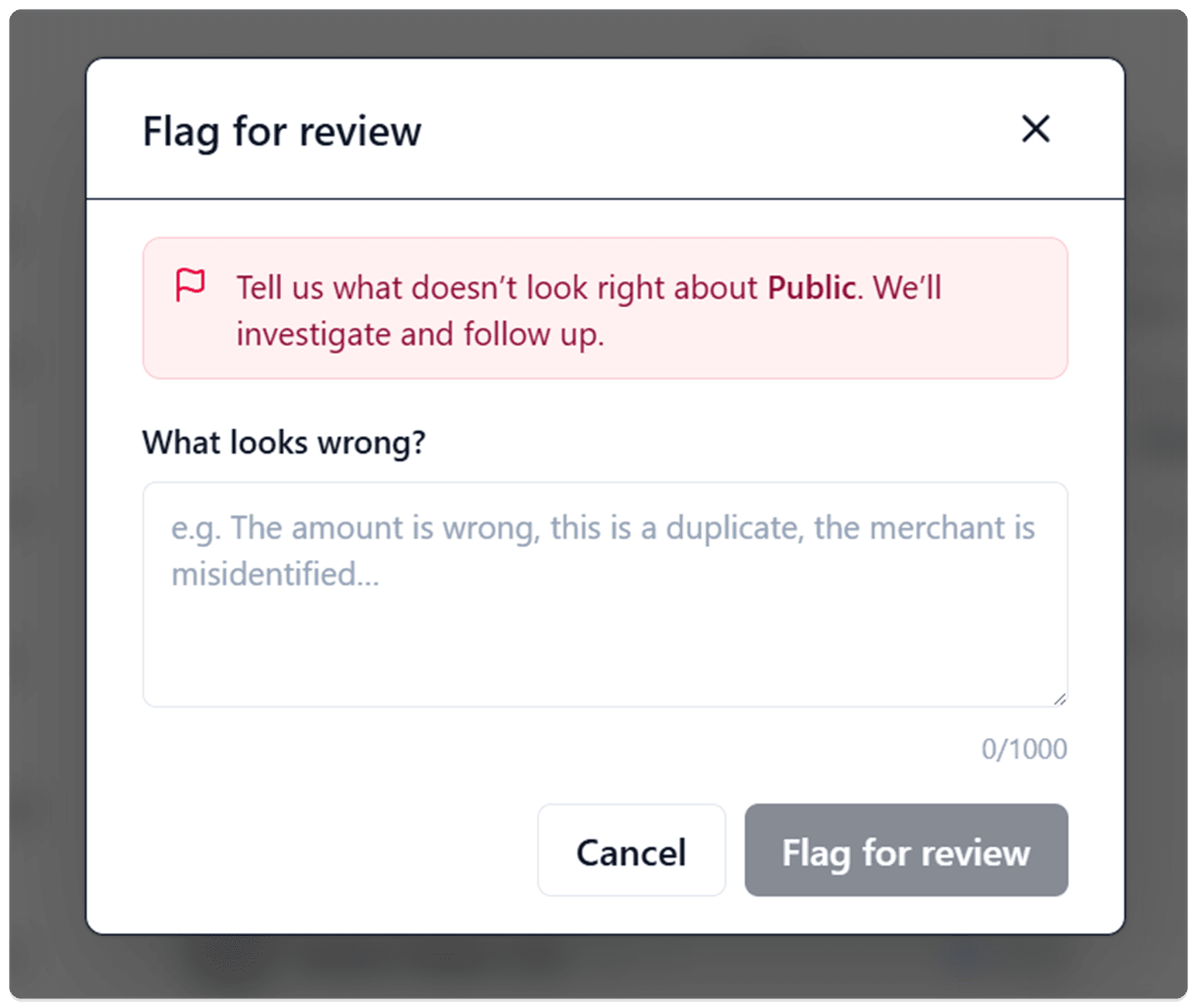
The "Flag for review" box open over the app. A rose-colored note reads "Tell us what doesn't look right about Public. We'll investigate and follow up," above a "What looks wrong?" text box with the example "the amount is wrong, this is a duplicate, the merchant is misidentified," and Cancel and Flag for review buttons.

When a transaction looks wrong, you can now flag it for review right from its details, tell us what's off in your own words, and a real person on our team takes a look.

Why it matters — Bank data isn't always perfect — an amount comes through wrong, the same charge shows up twice, or a payment gets pinned to the wrong store. We take that seriously, because your numbers are only as good as the data behind them. Now, instead of shrugging it off, you can tell us in a couple of taps and we'll set it right.

What you can do

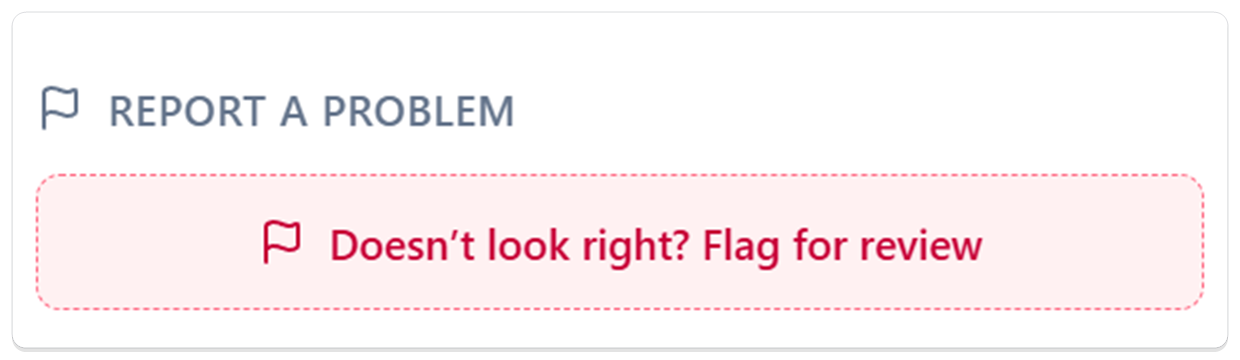
  • Flag anything that looks off — Open any transaction's details, scroll to Report a problem, and tap Doesn't look right? Flag for review.

The "Report a problem" section of a transaction, showing a dashed rose-colored button that reads "Doesn't look right? Flag for review."

  • Say what's wrong in your own words — There are no rigid categories to pick from. The box names the exact store and asks What looks wrong? — the amount is wrong, it's a duplicate, the store is misidentified, whatever it is, just type it. You've got room for a full explanation.
  • Know we got it — The moment you flag it, the transaction switches to an Under review card that says "You flagged this transaction. We're looking into it." No wondering whether it went through.
  • Spot your flagged items at a glance — A flag marker sits right on the transaction in your list, so the ones you've reported stand out without opening each one.
  • Change your mind anytime — Tapped flag by accident, or sorted it out yourself? Withdraw flag clears the report instantly, no questions asked.
  • Watch it clear when it's done — Once we've looked into it and set things right on our end, the "Under review" card goes away on its own.

What happens on our end

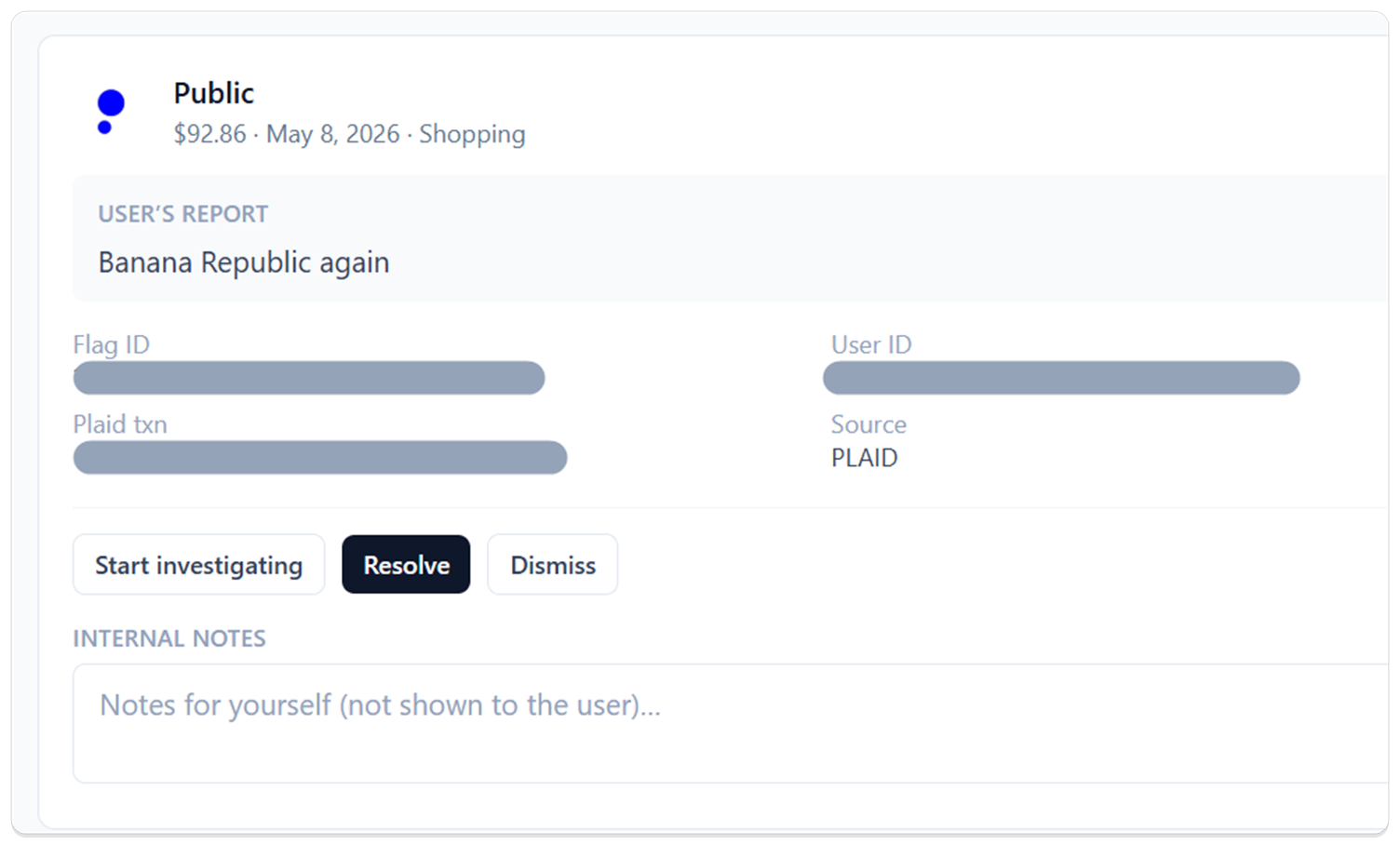
Every flag goes straight to a real person on our team — not a black hole. We see exactly what you reported next to the transaction, look into it, and follow up. Getting your data right is the whole job.

Our team's view of a flagged transaction: the store name and amount up top, the customer's report "Banana Republic again" highlighted below, and buttons to start investigating, resolve, or dismiss it. Internal reference numbers are hidden.

Good to know

  • One open report per transaction — A transaction can have a single active flag at a time. If you want to add more detail, withdraw the current one and flag it again with the full picture.
  • Your own transactions for now — You can flag transactions on your own accounts. Flagging something on a household member's account isn't supported yet.

Credit Card Rewards — what each card earns, and where you're leaving money on the table

v0.1.8

💳 See every card's bonus categories right on your Accounts page, plus a live month-to-date scoreboard of cashback you earned — and the exact swaps that would have earned more.

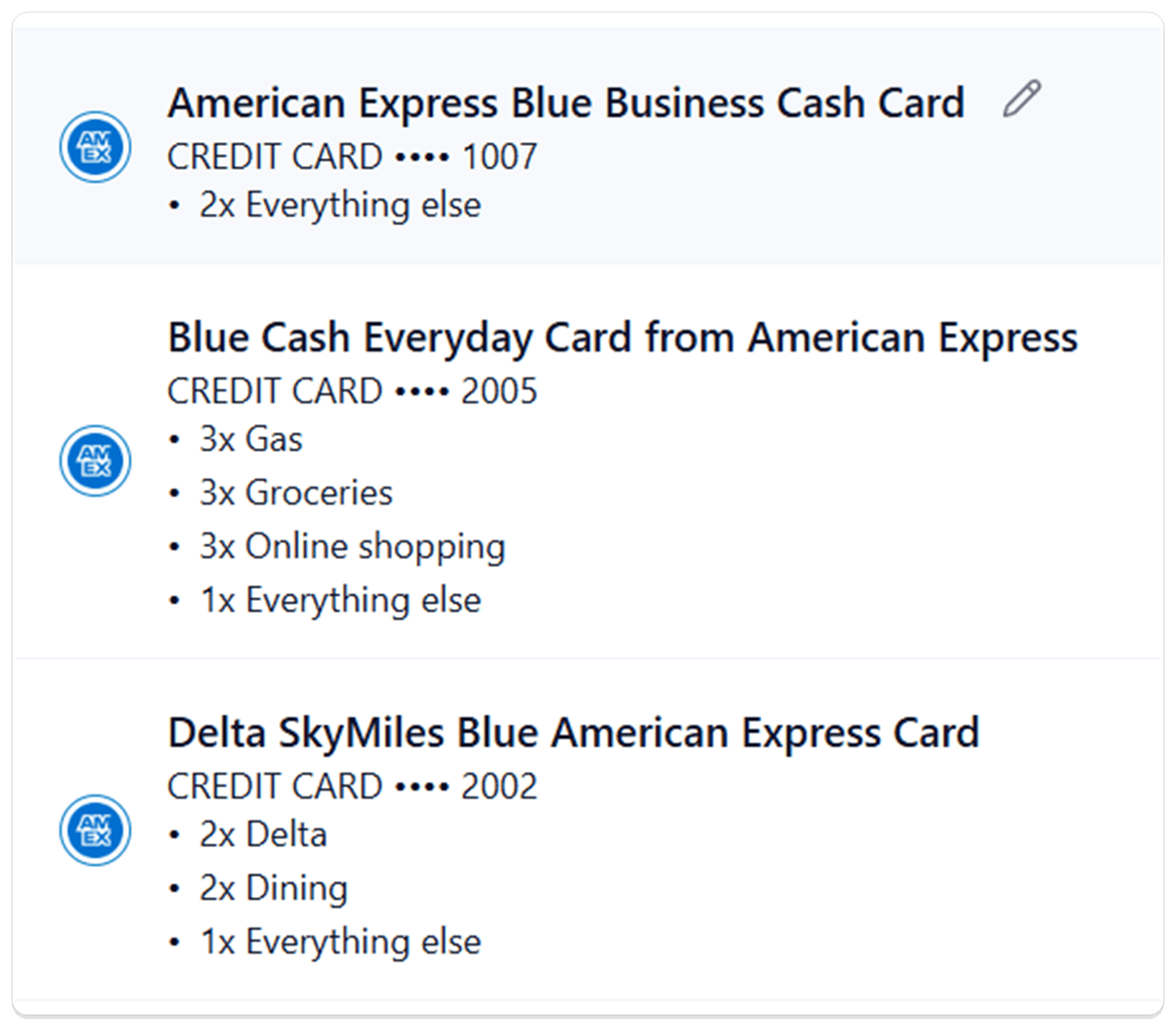
The Accounts page showing three American Express cards with their bonus categories listed underneath each one — 2x Everything else on the Blue Business Cash Card; 3x Gas, Groceries, and Online shopping on Blue Cash Everyday; 2x Delta and 2x Dining on the Delta SkyMiles Blue card.
  • Credit Card Rewards — Synx now figures out which exact credit card you have, lists every card's bonus categories right on the Accounts page, and runs a live month-to-date scoreboard on Spending Analysis that shows how much cashback you earned — and the exact card swaps that would have earned more.

Why it matters — Most people have three or four cards in the wallet and a vague sense that one of them earns 3x on dining and another one is the gas card. Synx removes the guesswork: every card's rules sit right next to the account, and at the end of any month you can see, in real dollars, how much you left on the table by reaching for the wrong card.

What you can do

  • Your cards get identified automatically — When you connect a card through your bank, Synx checks the account name against its list of US credit cards and picks the right one. If it's confident, you'll see Auto-detected ✓ on the row. If it's narrowed things down to a few options, the dropdown shows just those and you confirm with one tap.
  • Each card's earning rules at a glance — Every identified credit card on Accounts now lists its bonus categories sorted by rate — 5x Chase Travel, 5x Lyft, 3x Dining, all the way down to 1x everything else. Rotating-category cards like Freedom Flex show a 5x rotating categories row with a small info icon you can hover for an explanation. Cards with an annual fee show a neutral $95/yr badge next to the name so you can spot the keepers from the cuttable.
  • Preview a card's rewards before you commit — In the Edit account dialog, picking a different card from the dropdown shows that card's full earning rules right below — so you can confirm "yes, this is the one with 8x on Chase Travel" before saving.
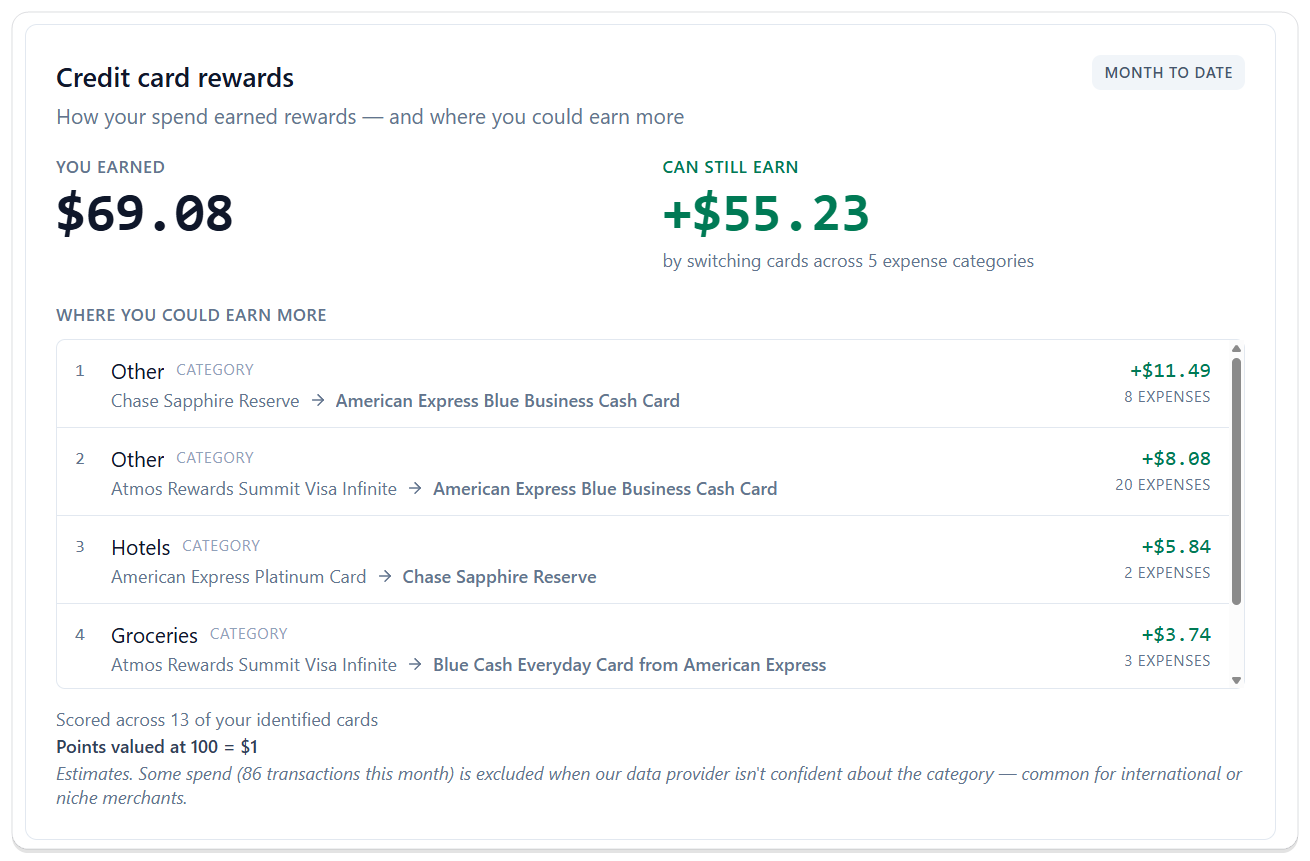
  • See your month-to-date cashback on Spending Analysis — A new Credit card rewards widget shows YOU EARNED in big numbers and updates as new transactions land. You don't have to wait for a statement — the scoreboard is live.
  • See exactly where you left money on the table — Right next to what you earned, CAN STILL EARN breaks down the dollars you would have gained by using a different card on specific categories this month. "Hotels — American Express Platinum → Chase Sapphire Reserve, +$5.84" tells you exactly which swap, and how much it was worth, ranked from biggest to smallest.
  • Apples-to-apples across points, miles, and cashback — Synx values points and miles at 100 = $1 so a 5x Hyatt card and a 5% cashback card line up cleanly. The rate is shown right on the widget so nothing is hidden behind the scenes.
  • Flag a missing or wrong card — If Synx doesn't recognize your card, or it picked the wrong one, the dropdown has a Don't see your card? link that opens a quick report. We use those to grow the list and get the matching right for the next person too.

The Spending Analysis credit card rewards widget. Top row shows YOU EARNED $69.08 alongside CAN STILL EARN +$55.23 by switching cards across 5 expense categories, with a MONTH TO DATE pill in the corner. The WHERE YOU COULD EARN MORE table ranks four swap suggestions — Other (Sapphire Reserve → Amex Blue Business Cash, +$11.49 across 8 expenses), Other (Atmos Rewards Summit → Amex Blue Business Cash, +$8.08), Hotels (Amex Platinum → Sapphire Reserve, +$5.84), and Groceries (Atmos Rewards Summit → Amex Blue Cash Everyday, +$3.74). Footer notes the score was based on 13 identified cards and that points are valued at 100 = $1.

Good to know

  • Coverage that keeps growing — Synx ships with a hand-built list of the most popular US credit cards. For the cards we haven't gotten to yet, AI fills in the earning rules so you still see useful numbers from day one. If something looks wrong, the Don't see your card? link tells us and we'll fix it for everyone.
  • Rotating-category bonuses aren't counted yet — We show that a card has rotating categories (like Chase Freedom Flex) so you know the rule is there, but we don't yet credit the rotating bonus in your month-to-date score. Full support is coming.
  • It's a guide, not an accountant — Your score is an estimate based on the transactions we can clearly see and categorize. It won't match your statement to the penny — and it's not meant to. The whole point is to help you pick the right card next time, not to balance your books.
  • A mobile widget is coming — We're building a Synx widget for your phone so you can pull up your month-to-date cashback and the best card swaps anytime — right from your home screen, no digging through the app.

Transaction Splits — one charge, every story behind it

v0.1.7

💸 Break a single charge into the pieces it actually was — different categories for each part, and a "needs payback" tag for the times you picked up the bill.

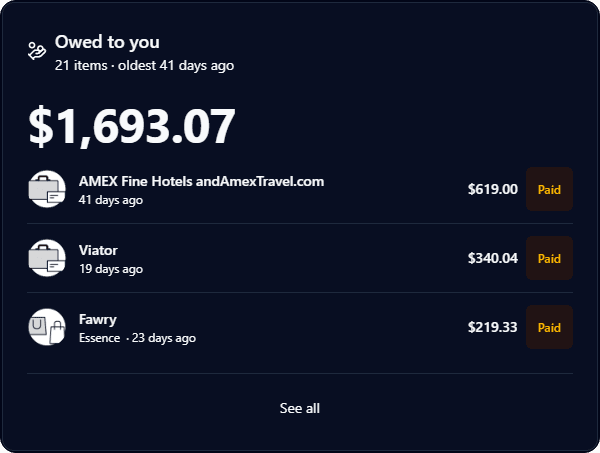
The new Owed to you tile on the Synx dashboard, totalling $1,693.07 across 21 unpaid needs-payback transactions with a See all link.
  • Transaction Splits — Take any transaction and break it into two or more parts, each with its own amount, category, and note. Pair it with the new needs payback tag for the times you grabbed the bill and friends still owe you their share.

Why it matters — Real spending isn't always tidy. The grocery run had a birthday gift in it. The dinner was you, your partner, and two friends who are paying you back next week. Splits let your categories and totals match what really happened, instead of dumping the whole charge into one bucket — or worse, counting money that isn't really yours to spend.

What you can do

  • Split from the transaction detail — Open any transaction and tap Split transaction. The split editor opens right there, with the original amount waiting to be divided.
  • Pick the split style that fits — Use Equal to divide evenly across parts, By amount to type each piece in dollars, or By percentage to split by share. Equal mode auto-balances; the others tell you how much is left to assign as you type.
  • Give each part its own category — The classic case: the $182 Target run was $140 groceries and $42 a birthday gift. Now your category totals reflect that, not a lump of "Shopping."
  • Add a note to each part — Label a piece "Mike's half" or "wedding gift" so you remember what it was when you look back.
  • Mark a part as needs payback — Check the box on any split part (or tag the whole transaction) when someone owes you back. It shows up as an amber chip on the row so it's easy to spot.
  • Drop paid-back amounts out of your spending — When the Venmo lands, mark the part as paid back. Synx automatically excludes it from your totals so you're not counted as having spent money that came back to you.
  • See what's still owed on your dashboard — The new Owed to you tile sums up every unpaid needs-payback transaction and lists the rows underneath. Mark one paid right from the tile and the total updates instantly; tap See all to jump straight to your transactions list filtered to unpaid only.
  • Edit or undo any time — Adjust the parts, change a category, or undo the split entirely and the original transaction comes back as it was.
  • Splits travel with your household — Anyone in your household can split a shared transaction, and the parts inherit the original's tags so nothing falls out of your existing views.

Good to know

  • Up to ten parts per transaction — Plenty for a group dinner; we cap it so the editor stays usable.
  • Split parts replace the original in your lists — Once split, you'll see the parts as separate rows. The original is tucked away so nothing gets counted twice. Undo brings it back.
  • Needs payback is a tracking tag, not an invoice — Synx doesn't send a request to the other person. It's there so you can see at a glance what's still outstanding and mark it paid back when the money lands.

Synx for Android — your money, in your pocket

v0.1.6

📱 The Synx Android app is live in Google Play. Sign in with a code, unlock with your fingerprint, and check your accounts, transactions, and spending from your phone.

  • Synx for Android — A native Android app, free on the Google Play Store, that talks to the same accounts and data you already use on the web.

Why it matters — Most money check-ins are five-second questions: Did that show up? What's left in groceries? Did Mom's transfer land? The phone is where those questions happen. Now you can answer them without opening a laptop.

What you can do

  • Sign in with a code, then your fingerprint — Enter your email, tap the six-digit code we send you, and you're in. After the first sign-in, Face ID or your fingerprint unlocks the app the next time you open it.
  • See the whole picture on Home — Net worth broken out by Cash, Investments, Credit Cards, Loans, and Other. Plus this month's spending so far and how it compares to last month, with your most recent transactions right underneath.
  • Search and filter your Transactions — Type a merchant or category to find it. Narrow by account, category, tag, or date range. Tap any transaction to see the full detail—merchant, account, date, amount—and re-categorize it or add tags right there.
  • Connect a bank without leaving the app — Tap Connect Bank on the Accounts tab and the Plaid flow runs in-app. Pull down to refresh balances. If a connection drifts, the reconnect prompt walks you through it.
  • Spending and Budgets on one tab — The Spending tab has two views. Analytics shows monthly income vs. expense bars and a category donut you can tap into. Budget shows your monthly, annual, and trip trackers with progress against the limit.
  • Flip between Personal and Household — If you've set up a household on the web, the toggle in Settings switches the whole app between just-you and shared-money views. The choice sticks across restarts.
  • Manage the rest from your phone — Settings has your plan and trial countdown, biometric toggle, categories, tags, automation rules, and quick links to Help, Privacy, Terms, and the full web app.

Good to know

  • Reviewed by Google Play before launch — Synx for Android spent about a month in closed testing with real users and passed Google's automated pre-launch security and stability scans before being promoted to the public Play Store. The listing also carries our Data Safety disclosure, which spells out what the app reads from your phone, what it sends to Synx, and why—nothing is sold to advertisers.
  • United States only — The Play Store listing is live in the US only.
  • iOS is on the way — An iPhone version is in development but not yet in testing. iPhone and iPad users can still use the full Synx product in any browser in the meantime.

Transactions date picker — jump back five years in a single click

v0.1.5

📅 Pick the month and year you want from a dropdown, or just type the dates—no more clicking the back arrow 24 times to look at transactions from two years ago.

  • Faster history on Transactions — The date range picker on Transactions now lets you jump straight to any month in the last five years, or type the exact dates you want.

Why it matters — The old picker only had a back arrow. Want to see what you spent in March two years ago? That was 24 clicks. Now it's two: pick the year, pick the month. Or type 03/01/2024 and you're there.

What you can do

  • Pick a year from a dropdown — The current month and year at the top of the calendar are now selectable. Click the year to jump straight to 2024, 2023, 2022, 2021, or 2020 instead of scrolling there one month at a time.
  • Pick a month from a dropdown — Same idea for months. Tap the month label, choose any month from January to December, and the calendar lands there immediately.
  • Type the dates directly — Two From and To fields sit at the top of the picker. Type 03/15/2024 and the calendar follows along. Useful when you already know the window you want and don't feel like clicking through a calendar at all.
  • Smart input handling — Typo-proof: invalid dates (like 02/30) revert to your last valid value. Years outside the 5-year range are rejected. If you accidentally set To before From, we swap them for you.

Recurring — your subscriptions and bills on one page, with next-charge dates

v0.1.4

🔁 Synx watches your actual transactions, picks out what repeats, and tells you when each one is next going to hit—calendar-aware, household-aware, and easy to archive the noise.

  • Recurring — A new section under Transactions → Recurring that picks out your subscriptions and regular bills automatically and estimates when each one is next going to hit.

Why it matters — Most subscription trackers make you type every one in by hand. Synx watches your transactions and figures out the cadence itself—Netflix on the 15th, rent on the 1st, quarterly insurance—and keeps the list up to date as new charges land.

What you can do

  • See subscriptions get detected automatically — After three consistent charges, we lock in a pattern and surface it under Active with a next-expected date. No typing, no importing.
  • Confirm or archive from "Needs your attention" — A small notification panel flags the engine's recent estimates. Two taps: confirm the ones you want tracked, ✕ to archive anything that isn't really a subscription.
  • Calendar view with real calendar math — Toggle to the calendar to see past charges and projected ones side by side. A 15th-of-the-month charge projects to the 15th of every future month—no drifting one day at a time. February's 28-day month handled gracefully and March snaps back to the 31st.
  • Tap any series for the full story — Detail sheet shows the linked transactions, the cadence, the amount range (with min/max to flag variable bills), and the next expected date.
  • Household works out of the box — See your recurring bills as a household. Irrespective of whether it is a charge on a household member's accounts or yours, let's find the recurring bills together.
  • Archive vs. Dismiss—two levels of "no thanks" — Archive hides the series from view but lets the engine re-detect if the merchant starts a new real pattern. Dismiss is the nuclear option: removes the Recurring tag and stops auto-detection for that merchant entirely.
  • Fix a cadence the engine got wrong — Pick the right weekly/biweekly/monthly/quarterly/annual from the series actions and we re-project the next date immediately.
  • Spot a single recurring charge in the list — A small new Synx tag sits next to any transaction that belongs to a recurring series, so you can scan the All Transactions view and see at a glance what's a subscription and what's one-off.

Good to know

  • Expenses only — We only look at outflows. Transfers between your own accounts, income, and refunds are excluded. A dedicated Cash Flow view is on the roadmap for those.
  • Three charges before we're confident — The engine keeps early-stage 2-charge hunches out of the way until a third matching charge lands and auto-promotes the pattern. Keeps the view focused on what's actually recurring, not a one-off shopping trip that happened twice. But if you want to mark a recurring transaction, you can nudge the engine.
  • Beta — Recurring is live and catching most real-world subscription patterns. We're actively tuning the detection thresholds as we see more data, so expect small refinements over the next few weeks.

Household (Beta) — see your money together, keep your accounts your own

v0.1.3

👥 Invite your partner into a shared view of spending, budgets, and categories—without merging logins or giving up your private accounts.

  • Household (Beta) — A shared financial view for couples. Invite your partner, and the two of you get one combined picture of spending and budgets while each keeping your own login, accounts, and privacy controls.

Why it matters — Most couples don’t actually want one joint account for everything. Household lets you split what stays personal and what you look at together, without copying data into a spreadsheet or handing over passwords.

What you can do

  • Create a household and invite your partner — From Settings → Household, name your household and send an invite by email. They get a secure accept or decline link that’s good for 7 days.
  • Switch between “Us” and “You” — Toggle between the shared household view and your personal view at any time, so you can check the household picture or zoom into just your own.
  • See combined spending and budgets — Transactions, categories, and budget pacing roll up across both members in the shared view, so you can see where the household actually stands this month.
  • Keep categories consistent — The Primary’s categorization rules apply to the shared view, so “Groceries” means the same thing for both of you and the numbers line up.
  • Fix each other’s categories — Either member can retag a transaction in the shared view—useful when one of you swipes a card and the other is the one keeping things tidy.
  • Avoid double-counting shared accounts — If you both linked the same joint account at the same bank, Synx flags the duplicate and lets the Primary merge it so household totals don’t count it twice.
  • Manage roles cleanly — The Primary invites and manages the household; either member can leave voluntarily, and the Primary can hand off the role to the other member before leaving.
  • Earn tokens when your partner joins Access — When an invited member signs up for Synx Access within 30 days of accepting your invite, both of you get 500 tokens ($5) credited automatically. No codes, no forms—the credit just shows up and applies against future Synx fees.

Good to know

  • Beta — Household is live and fully functional, and we’re actively refining it. Expect small improvements as we learn how real couples use it.
  • Two members for now — Today a household is Primary + one Member. Larger households are on the roadmap.
  • Invites expire in 7 days — Send a fresh one anytime if it lapses.
  • Only accepted members see shared data — Pending, declined, or former members never appear in the shared view.

Dark Mode — easy on the eyes, everywhere in Synx

v0.1.2

🌙 Pick light, dark, or match your device—one choice applies across the whole site and app, with colors tuned so everything stays clear and readable.

  • Dark Mode — You can keep Synx bright, switch to a darker look, or follow whatever your phone or computer is already using. We remember your choice so you don’t have to set it again each visit.

Why it matters — People often keep money apps open for a while. Dark mode cuts glare for evening use and long sessions, while charts, lists, and buttons stay easy to read—we didn’t trade clarity for a darker screen.

What we built

  • A single setting that travels with you — The same look applies to the public pages, your signed-in workspace, and the screens you use to manage accounts and spending—no patchwork of light and dark from page to page.
  • Calendars and date pickers — Choosing dates in dark mode looks as intentional as the rest of the app, with clear highlights for today and what you’ve selected.
  • Homepage that still makes sense — On the marketing home page, the top bar adjusts as you scroll so navigation stays readable whether you’re over a dark hero or lighter content below.
  • Settings you’ll actually find — Under Settings → General, next to your profile, you’ll see Light, Dark, and System so you can change the look anytime without digging through your device settings.
  • Release notes that match — This changelog and other long reads use the same comfortable colors as the rest of Synx when you’re in dark mode.

What you can do

  • Choose Light, Dark, or System in General settings—or leave it on System to follow your device.
  • Work in dark mode end to end — Budgets, transactions, imports, charts, and onboarding all follow your choice.
  • Browse the marketing site and legal pages in dark mode with a consistent header, footer, and navigation.
  • Spot Synx at a glance — Our teal accent stays familiar in both light and dark so links and important actions still feel like Synx.

Budget Tracker — goals that follow your real spending

v0.1.1

🎯 Monthly, annual, and trip budgets tied to categories and tags—pacing, roll-ups, and history in one calm place.

  • Budget Tracker — Turns categories and tags into goals you can watch as you spend—not a static sheet you update once and forget.
  • Why it’s different — You're no longer forced to fit your budgets into the frame of a monthly box. We know your budgets don't always operate on a monthly window.

What you can do

  • Cap spending by sub-category (monthly) — Pick a sub-category, set a limit, and watch spent vs. limit with a clear progress bar. Jump between months to compare or review how you did.
  • Plan annual limits (year-to-date) — Follow the same sub-categories across the calendar year so subscriptions, hobbies, and travel don’t quietly drift.
  • Budget trips and events with tags — Name a tracker, attach tags, and roll every tagged purchase into one progress view—vacations, weddings, or any time-bound spend.
  • See the big picture — Monthly trackers nest under parent categories so you get detail and a rolled-up read on how each area is pacing.
  • Know where you stand — Remaining or overage sits next to each tracker, with subtle color cues for safe, tight, or over.
  • Same data as the rest of Synx — Uses the same transactions and categorization—the goals you set always reflect what actually hit your accounts.

Synx Launches

v0.1.0

✨ First public release—connect accounts, see spending clearly, and skip the spreadsheet grind.

  • Synx — A calm, focused app for everyday money—not another dashboard you never open. We’re excited to share it with you.
  • The idea — See where your cash goes, act on it quickly, and keep categorization from getting in your way.

What you can do

  • Connect banks securely — Link accounts and work from live balances and activity, with privacy in mind.
  • Stay current automatically — Transactions refresh as your bank allows, so your view of spending stays up to date.
  • Categorize without the busywork — Smart defaults plus rules you control, so repeat merchants and patterns fall into place.
  • Tag what matters — Trips, projects, people—add tags when you need a custom lens and slice spending your way.
  • Organize categories your way — Nest sub-categories under parents so reports match how you think about money.
  • See spending in charts — Turn lists into trends you can actually use in the moment.
  • Try it on us — Explore the full experience while we keep building with you.
  • What’s next — Synx is just getting started—thank you for being early.