
Credit Card Rewards: what each card earns, and where you're leaving money on the table
v0.1.8💳 See every card's bonus categories right on your Accounts page, plus a live month-to-date scoreboard of cashback you earned and the exact swaps that would have earned more.
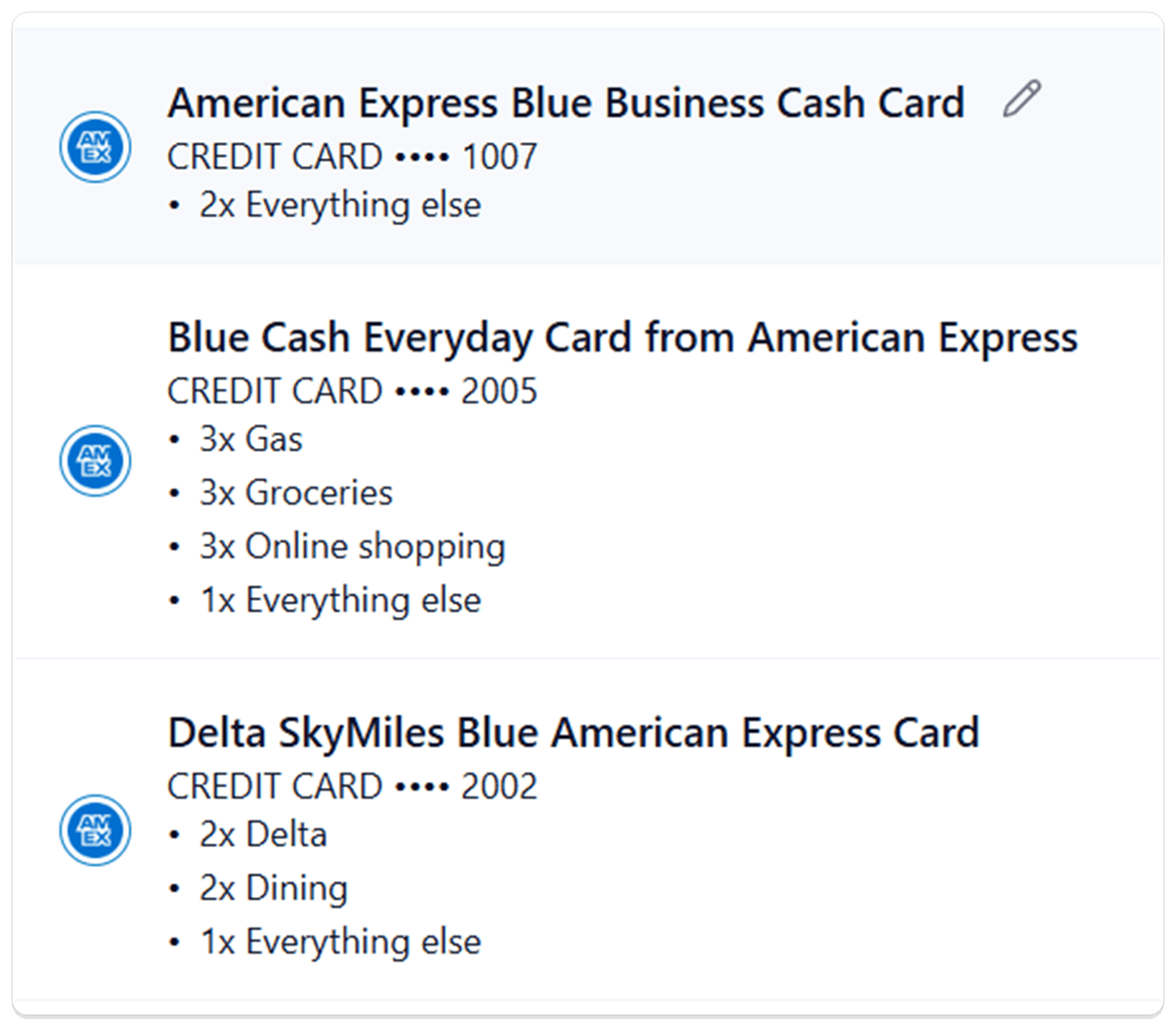
- Credit Card Rewards: Synx now figures out which exact credit card you have, lists every card's bonus categories right on the Accounts page, and runs a live month-to-date scoreboard on Spending Analysis that shows how much cashback you earned and the exact card swaps that would have earned more.
Why it matters: Most people have three or four cards in the wallet and a vague sense that one of them earns 3x on dining and another one is the gas card. Synx removes the guesswork: every card's rules sit right next to the account, and at the end of any month you can see, in real dollars, how much you left on the table by reaching for the wrong card.
What you can do
- Your cards get identified automatically: When you connect a card through your bank, Synx checks the account name against its list of US credit cards and picks the right one. If it's confident, you'll see Auto-detected ✓ on the row. If it's narrowed things down to a few options, the dropdown shows just those and you confirm with one tap.
- Each card's earning rules at a glance: Every identified credit card on Accounts now lists its bonus categories sorted by rate:
5x Chase Travel,5x Lyft,3x Dining, all the way down to1x everything else. Rotating-category cards like Freedom Flex show a5x rotating categoriesrow with a small info icon you can hover for an explanation. Cards with an annual fee show a neutral$95/yrbadge next to the name so you can spot the keepers from the cuttable. - Preview a card's rewards before you commit: In the Edit account dialog, picking a different card from the dropdown shows that card's full earning rules right below, so you can confirm "yes, this is the one with 8x on Chase Travel" before saving.
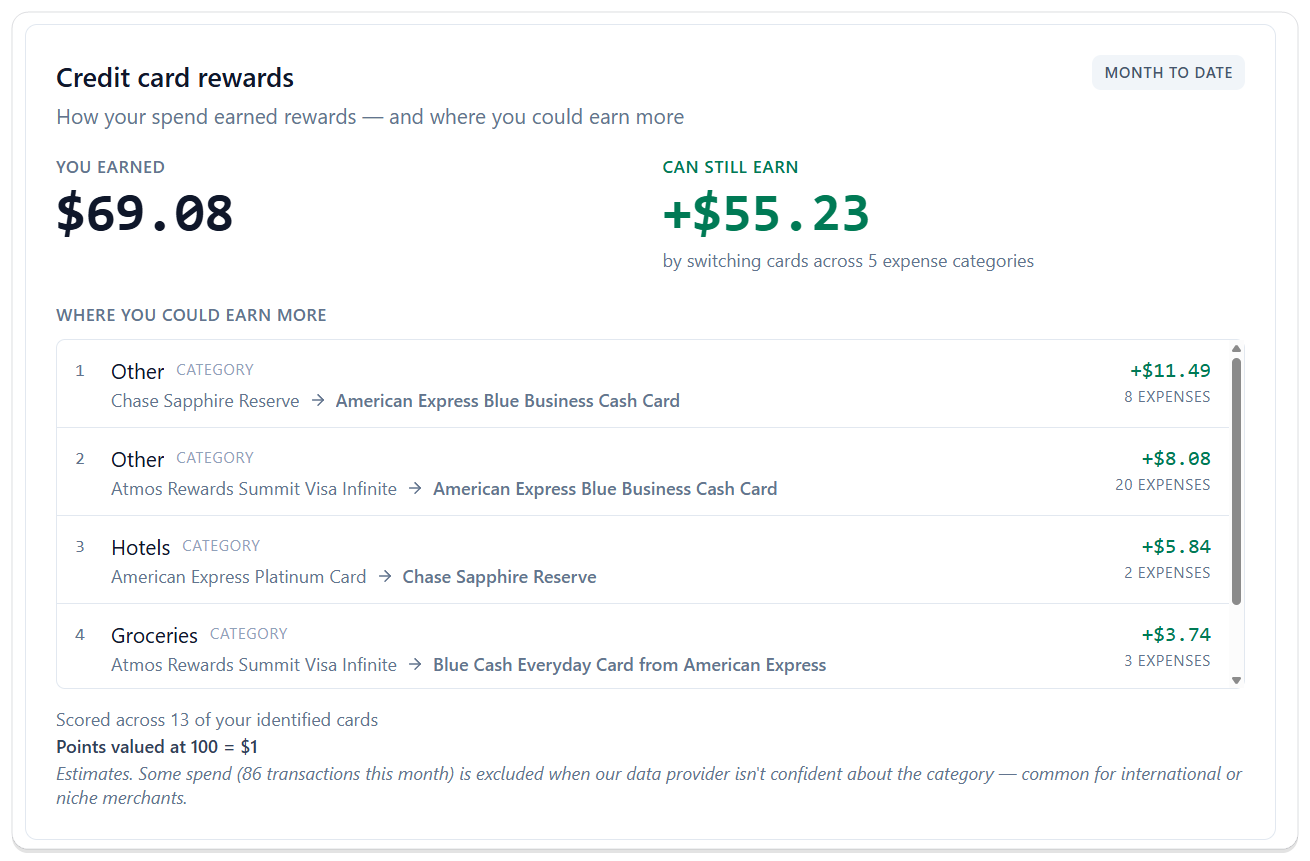
- See your month-to-date cashback on Spending Analysis: A new Credit card rewards widget shows YOU EARNED in big numbers and updates as new transactions land. You don't have to wait for a statement. The scoreboard is live.
- See exactly where you left money on the table: Right next to what you earned, CAN STILL EARN breaks down the dollars you would have gained by using a different card on specific categories this month. "Hotels: American Express Platinum → Chase Sapphire Reserve, +$5.84" tells you exactly which swap and how much it was worth, ranked from biggest to smallest.
- Apples-to-apples across points, miles, and cashback: Synx values points and miles at 100 = $1 so a 5x Hyatt card and a 5% cashback card line up cleanly. The rate is shown right on the widget so nothing is hidden behind the scenes.
- Flag a missing or wrong card: If Synx doesn't recognize your card, or it picked the wrong one, the dropdown has a Don't see your card? link that opens a quick report. We use those to grow the list and get the matching right for the next person too.
Good to know
- Coverage that keeps growing: Synx ships with a hand-built list of the most popular US credit cards. For the cards we haven't gotten to yet, AI fills in the earning rules so you still see useful numbers from day one. If something looks wrong, the Don't see your card? link tells us and we'll fix it for everyone.
- Rotating-category bonuses aren't counted yet: We show that a card has rotating categories (like Chase Freedom Flex) so you know the rule is there, but we don't yet credit the rotating bonus in your month-to-date score. Full support is coming.
- It's a guide, not an accountant: Your score is an estimate based on the transactions we can clearly see and categorize. It won't match your statement to the penny, and it's not meant to. The whole point is to help you pick the right card next time, not to balance your books.
- A mobile widget is coming: We're building a Synx widget for your phone so you can pull up your month-to-date cashback and the best card swaps anytime, right from your home screen, no digging through the app.