
Refunds now count: money back lowers what you spent
v0.1.13🧾 Get a refund or a credit and it now comes off what you spent for the month, and your spending total reads the same on every screen.
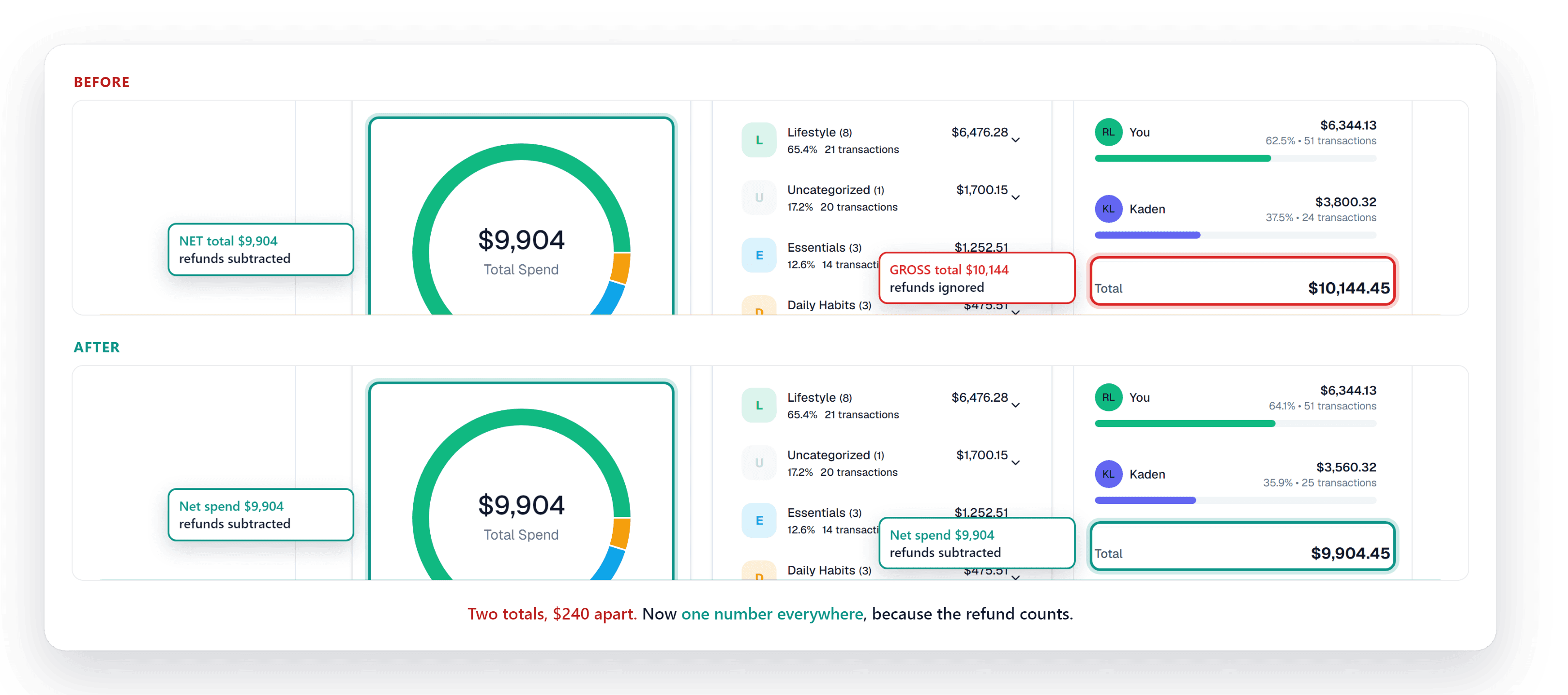
- Refunds now lower your spending: when a store gives you money back, it comes off what you spent, and your spending total reads the same everywhere in Synx.
Why it matters: Money you got back isn't money you spent. Now a refund actually brings your spending down, and the total on your dashboard matches the total on your Spend page instead of being two different numbers.
What's new
- Money back comes off your spending: Returned something, got a price adjustment, or earned a statement credit from your card? That money now subtracts from what you spent that month, in your category breakdown, the spending ring on the Spend page, and the spending-versus-income bars. Before, some of these counted a refund and some quietly ignored it.
- One spending number, everywhere: Your month's spending now reads the same on your dashboard, on the Spend page, and in the Spend by Member panel. No more seeing one total in one place and a different total a click away.
- A partner who came out ahead shows as money back: In the shared household view, if one of you got back more than you spent in a month, the Spend by Member panel now shows that as money returned instead of leaving that person off the list.
Good to know
- Transfers and card payments still aren't spending: Paying your credit card bill or moving money between your own accounts has never counted as spending, and still doesn't. This change is only about real purchases and the refunds that go against them.