
Cash flow, line by line
v0.1.23🔎 Open the month behind your Cash Flow number and read every transaction that made it, sorted into money in, money out, and money you moved between your own accounts. Card payments now say what they are.
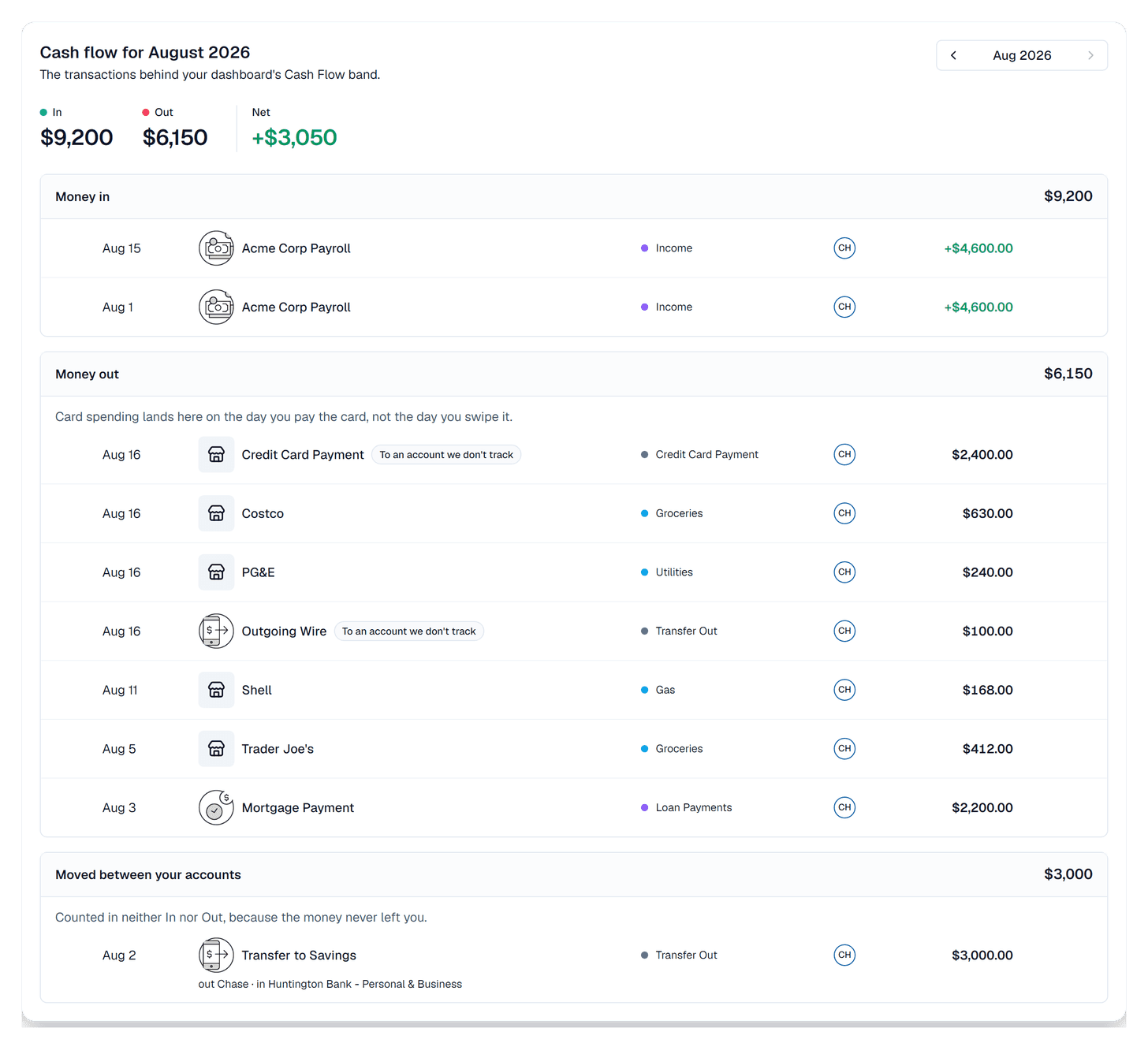
- Cash flow, line by line: the Cash flow tab on your transactions page now opens the month behind your dashboard's Cash Flow number, every transaction in it, grouped so you can see what each figure is made of.
Why we built it: The new feature on your dashboard provides a single cash flow figure with what came in and what went out. But you can't check what makes up these numbers. This feature gives you the transparency to check it yourself.
What you can do
- Open the month from the dashboard: See transactions under the Cash Flow band drops you straight into this view for whichever month you were looking at. The Cash flow tab on your transactions page gets you there too.
- Read the month in three groups: money that came in, money that went out, and money you moved between your own accounts, each with its own total sitting in the group header.
- Check the totals against the dashboard: each group total is the same figure the dashboard band shows for that month. They come from the same place, so they can't drift apart.
- See every row in full: date, merchant, category, which account it hit, and the amount, the same way your transactions list shows them. Click any row to open it and edit it like you would anywhere else.
- Find where money you moved actually went: a payment or transfer whose other side isn't in Synx says so on the row. That line is usually the answer to "why is Out higher than I thought".
- A card payment now says it's a card payment: paying off a card used to show up as Transfer Out, which is also what two unrelated things were called. The money leaving your checking account now reads Credit Card Payment, and the matching row landing on the card reads Payment Received. In most months that payment is the single largest line in Money out, so it's the one row worth being able to name at a glance.
- Switch months without leaving: the month picker at the top moves you through your history, and the three figures and all three groups follow.
- See what isn't being counted: if an account's kind is unknown, a note under the groups names it and links you to Accounts so you can set it. Nothing is quietly left out.
Good to know
- A group total never changes because rows are hidden: long groups collapse behind Show all, but the total in the header is always the whole month. What you see and what's counted can't disagree.
- Money you move between your own accounts sits in its own group on purpose: it isn't money arriving and it isn't money leaving, so it stays out of In and Out. It's shown rather than dropped, because a transfer you can't find reads as missing money.
- The new card payment names reach back through your history: we relabelled past payments as well as new ones, so an old month reads the same way this one does. Only the wording changed. Your spending totals and cash flow figures came out on exactly the same numbers, checked month by month before and after.
- Card payments still stay out of your spending: they always have, under the old name and the new ones. Paying the card isn't a second purchase, and the things you bought with it are already counted.
- A card swipe won't be here on the day you made it: swiping moves debt, and the money leaves when your card payment clears. The payment is the row you'll find in Money out, for the full amount, on the day it cleared.
- Editing a row here updates the figures: recategorize something in this view and the group totals and your dashboard band both catch up.