How much has to stay in checking
v0.1.27🔮 Your dashboard now projects your balance over the next 30 days, accounting for your bills and paychecks, and alerts you if you're short.
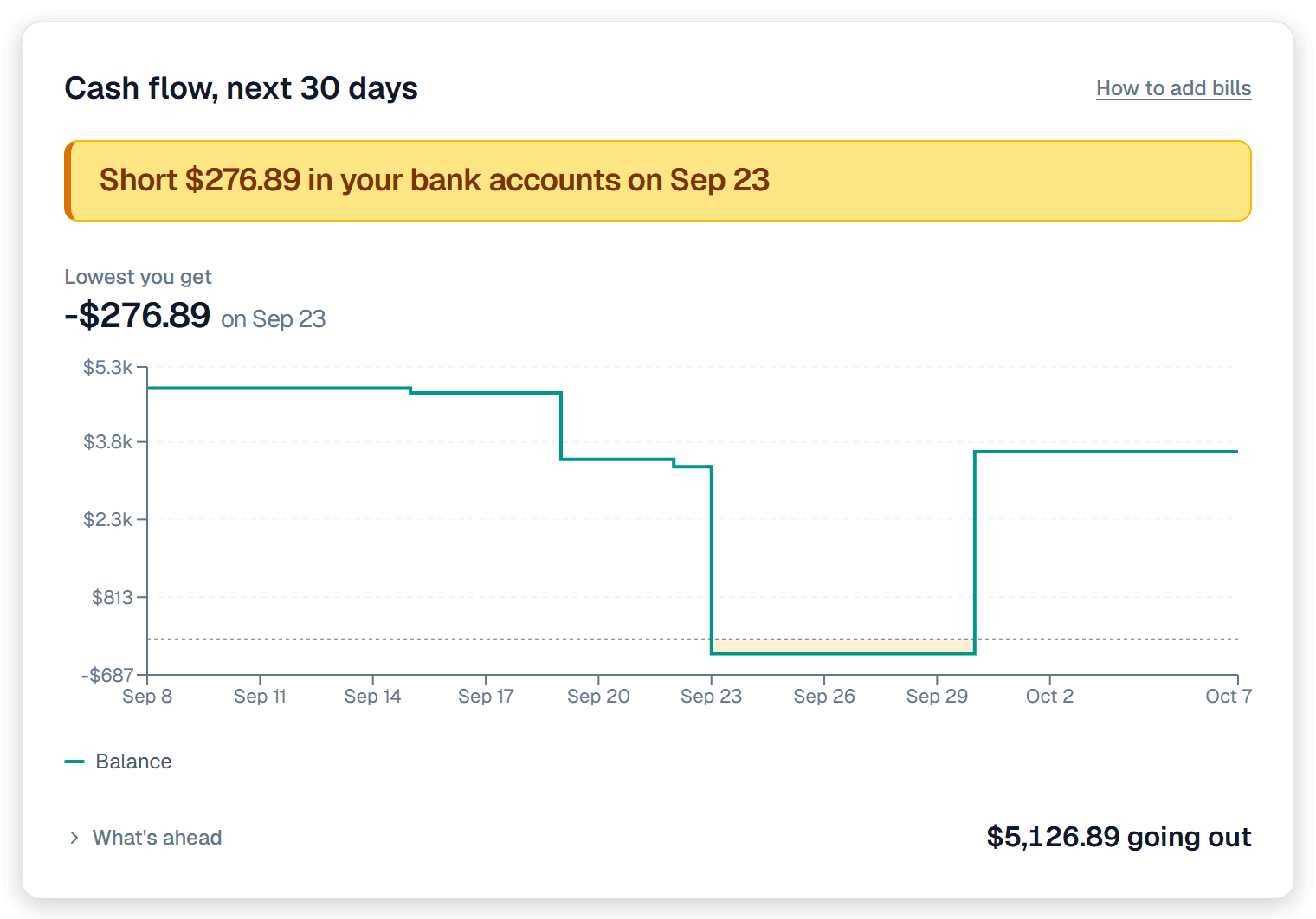
- Cash flow, next 30 days: a new section on your dashboard that projects your balance over the next 30 days, accounting for your bills and paychecks. Then alerts you if you're short.
Why we built it: We were mid-project building a backyard cottage using our line of credit. Every week, we had to make sure we had enough in our main checking account to cover our loan payments. Now that we're done, we can easily identify how much we can put in higher yield accounts.
What you can do
- See the day you run short: the section leads with one sentence. Short $276.89 in your bank accounts on Sep 23 when the money runs out before payday.
- Watch the line walk forward: the chart steps down on each bill and back up when your paycheck lands. Where it crosses below zero is shaded, so a week you can't cover is something you see coming rather than something you find out about.
- Open what's behind the number: What's ahead lists every bill and expected charge in the window, with the total going out.
- Forward your statements to fill it in: send card and loan statement emails to your private Synx address and the amount due and the due date go straight into the walk. The address is on Settings → Inbox.
Good to know
- Bills come from your email, not your bank: your bank tells us your balance, never what you owe next month. Forwarding the statement is what turns a guess into a real number.
- A card swipe isn't in here until it's billed: the walk counts what you owe on a statement, not what you spent yesterday. Spending you haven't been billed for turns up when the next statement does.
- It's 30 days, not a budget: this answers whether the money you already have covers what's already scheduled. Groceries and gas aren't in it.
New to this? How to set up cash flow so the numbers are right walks through every input it reads, in order.